


Most ecommerce managers spend upwards of 10 hours every month manually stitching together spreadsheets from Google Search Console, GA4, and WooCommerce order exports. This manual approach is a relic of the past that is prone to error and consistently fails to connect search performance to actual revenue. Automation is the only way to scale an ecommerce store while maintaining a clear view of your WooCommerce SEO ROI.
The problem with standard ecommerce reporting
Standard reporting tools often fail because they treat search data and sales data as two separate islands. I have seen countless marketing teams celebrate a 20% increase in organic traffic, only to realize weeks later that the traffic was landing on out-of-stock products or low-margin categories that do not move the needle for the business.
The core issue is that 3rd party keyword data from mainstream tools is often useless for accurate decision-making. These databases are typically too small to accurately represent the niche, long-tail opportunities that drive the majority of ecommerce sales. To get a real picture of performance, you must rely on first-party data from Google Search Console (GSC) and your own WooCommerce database. If you are basing your strategy on third-party volume estimates, you are essentially flying blind.
Connecting your data ecosystem
Before you can automate your reporting, you need to build a unified data layer. For WooCommerce stores, this means ensuring that your Google Analytics 4 (GA4) implementation is “catalog-aware” so that search intent matches up with purchase behavior.
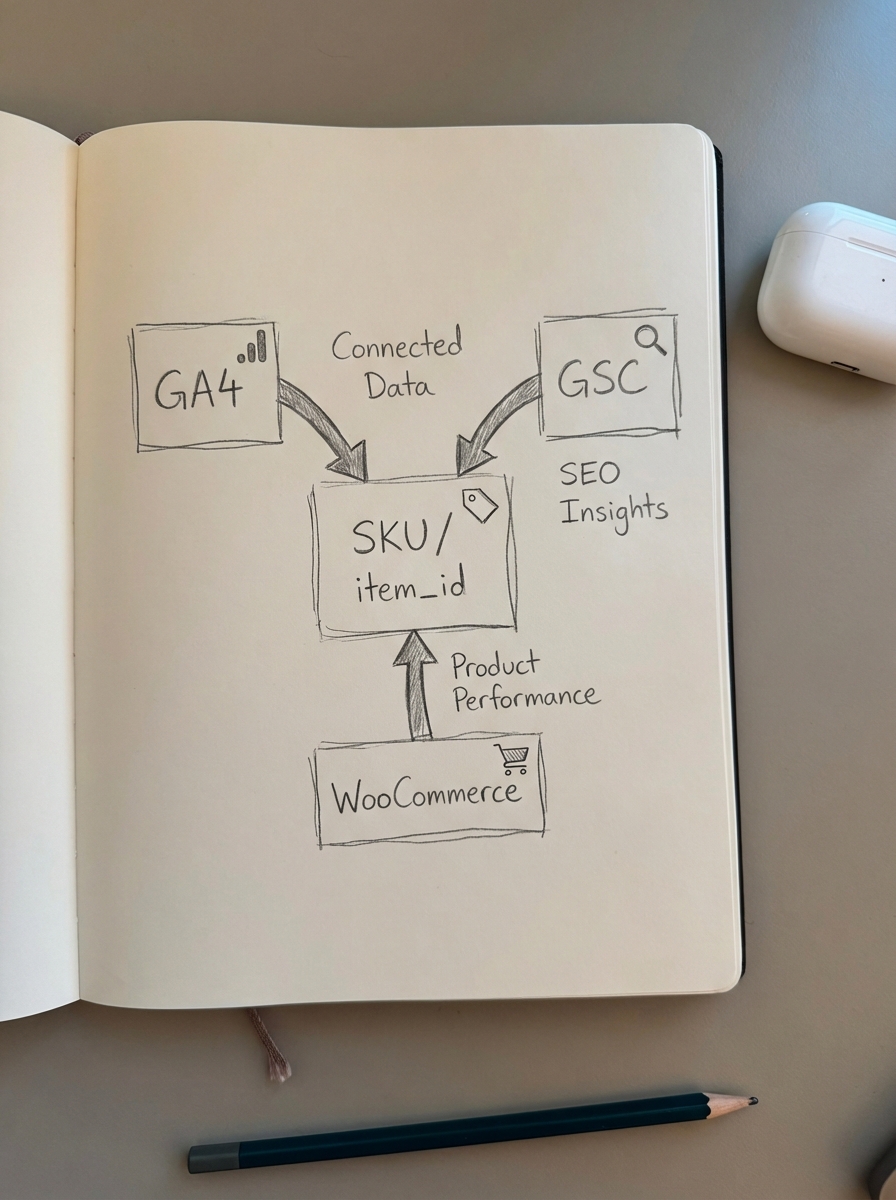
The first step is combining Google Analytics and Search Console data within the GA4 interface. This link allows you to see impressions and click-through rates alongside engagement metrics like scroll depth and conversion rate. However, the most critical technical requirement is the SKU sync. Your GA4 item_id parameter must match your WooCommerce SKU exactly. Without this one-to-one mapping, you cannot track which organic landing pages are driving specific product sales or determine which keywords are actually profitable.
To bridge the gap between your site’s blog content and your product catalog, I recommend using the WordPress connector plugin from ContentGecko. This ensures that when you report on a blog post’s performance, the system understands exactly which SKUs that post is designed to sell. It turns your blog from a collection of articles into a functional extension of your sales funnel.
Automating rankings and visibility tracking
Stop manually checking rankings for individual keywords. It is a vanity exercise that distracts from high-level strategy and wastes time. Instead, you should automate a visibility report that segments your site by page type. In my experience, most ecommerce sites would benefit greatly from more specific category names and a heavier focus on category-level visibility rather than individual product pages.
It is way more important to optimize category pages than product pages. Your automated reports should reflect this hierarchy by setting up filters to separate your “money” pages from your top-of-funnel content. By using an ecommerce SEO dashboard, you can automatically group these URLs into distinct segments:
- Category Pages: Your primary drivers for broad, high-intent search terms.
- Product Pages: Essential for tracking specific SKU intent and long-tail “model number” searches.
- Blog Content: The engine for top-of-funnel discovery and building topical authority.
If visibility for a “Main Category” drops, an automated dashboard will highlight the trend immediately, allowing you to react without digging through a list of 5,000 individual keywords.
SKU-level performance and conversion automation
The most valuable metric in WooCommerce SEO is revenue per product from organic search. To automate this, you need to pull data directly from the WooCommerce API or a dedicated suite of SEO KPIs that connect to your transaction data. A truly automated report should identify which blog posts led to an “Add to Cart” event and differentiate the conversion value of non-branded search terms versus branded terms.
ContentGecko handles this complexity by syncing directly with your WooCommerce catalog. If a product goes out of stock or a price changes, our system can update the relevant content and track the performance shift automatically. This eliminates the “dead link” problem that plagues manual ecommerce content strategies. When your reporting is integrated with your catalog, you stop guessing which content needs an update and start prioritizing based on actual revenue impact.
Building stakeholder dashboards in Looker Studio
For agencies or internal stakeholders who need a “single source of truth,” Looker Studio reporting is the standard. It is cost-effective and integrates directly with the Google ecosystem, making it the ideal place to visualize your automated data streams.
Your automated dashboard should go beyond simple traffic charts. I recommend including an “Executive Summary” for a 30-second snapshot of organic revenue and conversion rates. You should also track “Potential Clicks,” which uses GSC data to estimate how many additional clicks you could capture if keywords currently in positions 4–10 moved to the top spot. This highlights your “low-hanging fruit” opportunities. Finally, include a “Content Health” section to identify content decay – pages where traffic has declined over the last 3–6 months – which signals a need for an automated refresh. Brands that adopt these AI-integrated SEO workflows report saving over 10 hours weekly on reporting tasks.
Scheduling alerts and recurring delivery
Automation is only effective if the data reaches the right people at the right time. You should set up automated email reports on a tiered cadence to ensure you are staying proactive rather than reactive. Weekly reports should focus on traffic and ranking fluctuations for your top 50 keywords, while monthly reports should provide a deep dive into organic ROI and SKU-level performance.
I strongly suggest setting up “Anomaly Alerts” within your SEO reporting tools. If organic traffic to a high-converting category drops by more than 20% in a 48-hour period, the system should trigger a Slack notification or email immediately. This proactive approach allows you to catch technical issues or algorithm shifts before they result in a massive loss of monthly revenue.
TL;DR
To automate WooCommerce SEO reporting effectively, you must connect GA4 and GSC using a shared SKU identifier to bridge the gap between search intent and sales data. Focus your dashboards on page-type segmentation – prioritizing category pages over product pages – and use tools like ContentGecko to sync your catalog and track SKU-level conversions. Relying on your own first-party data is the only accurate way to measure ROI and scale your store without the manual overhead of spreadsheets.