


Keyword intent determines whether a searcher wants to learn, compare, or buy. Get this wrong in your WooCommerce store, and you’ll burn crawl budget on pages that don’t convert while missing the queries that actually drive revenue.
The difference between targeting “running shoes” (commercial) and “buy Nike Pegasus 40 size 9” (transactional) isn’t subtle – it’s the difference between a bounce and a sale. Most WooCommerce merchants treat keyword research as a volume game, targeting high-volume terms and ranking for everything tangentially related to their products while wondering why organic traffic doesn’t convert.
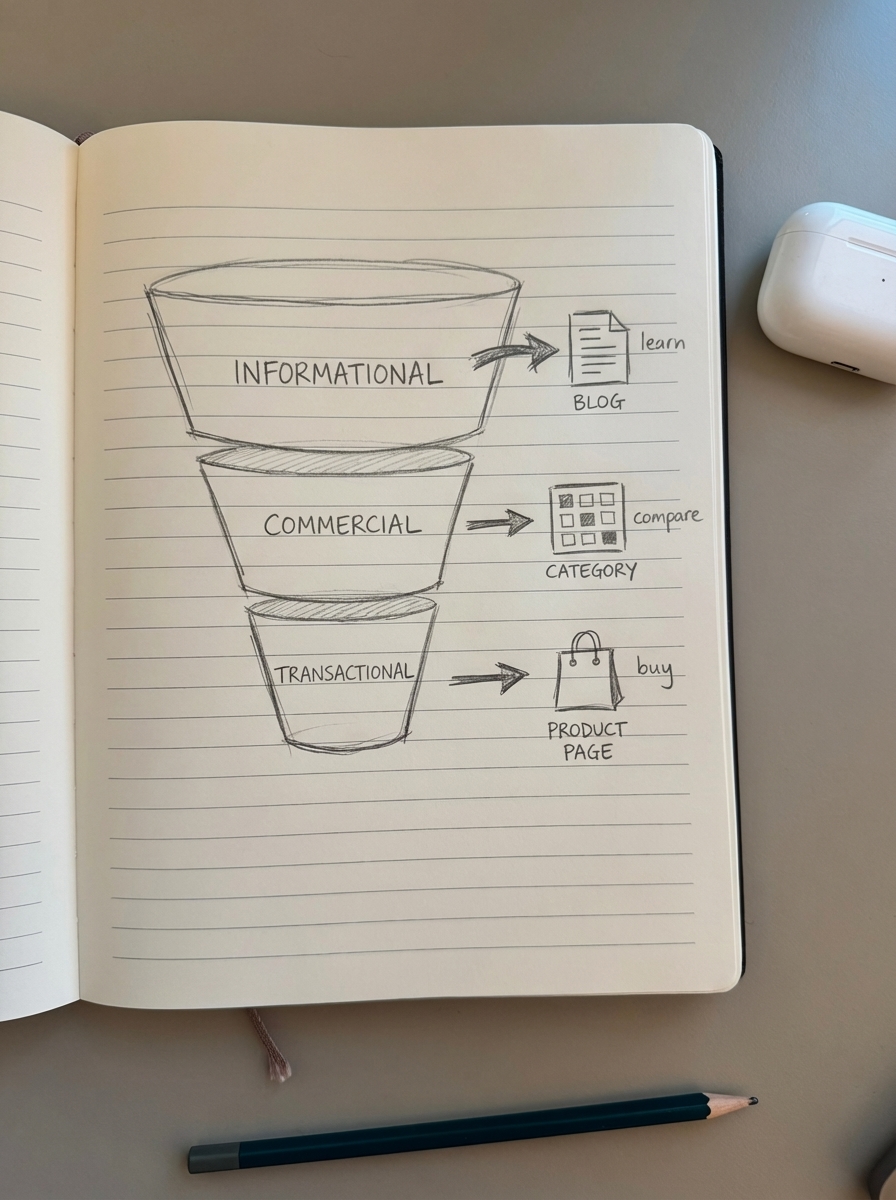
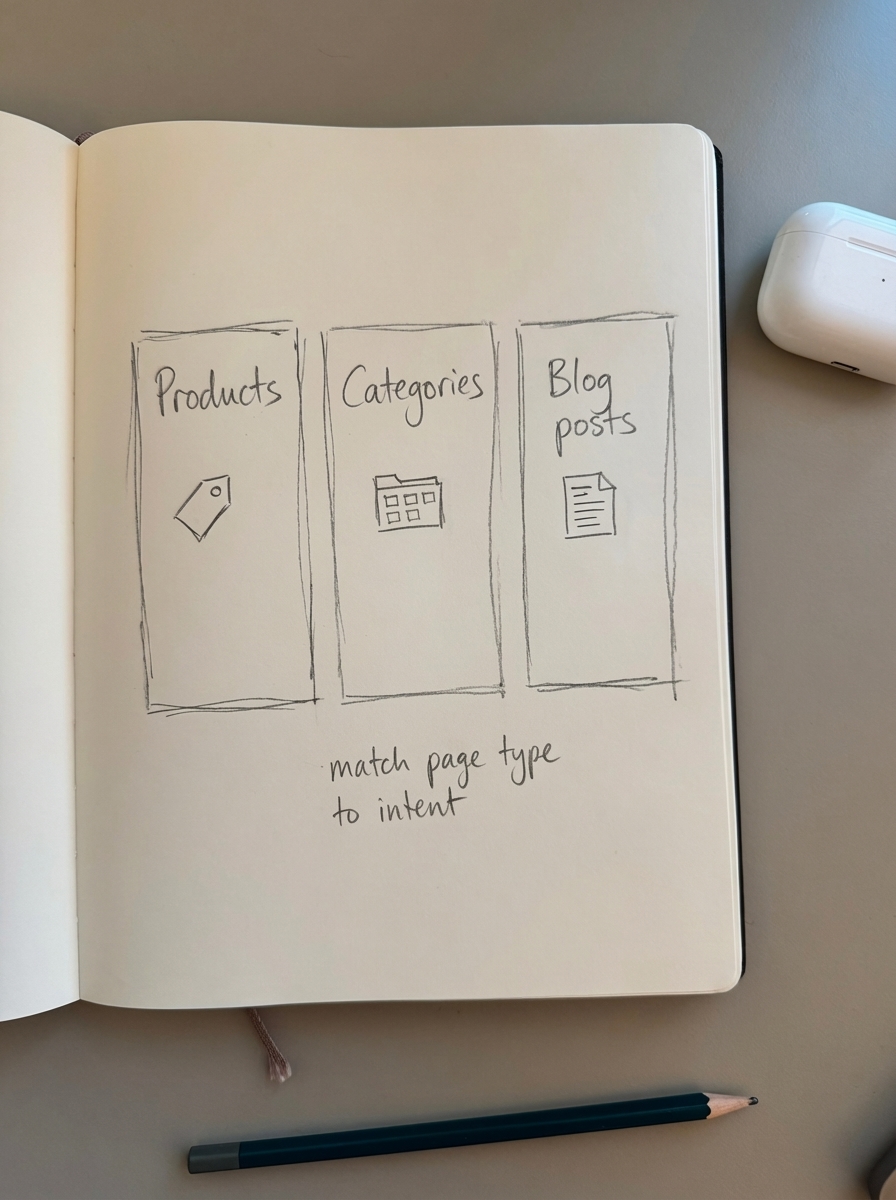
The fix: intent-led keyword research that maps queries to the right page types – category pages for commercial intent, product pages for transactional intent, and blog content for informational queries.
Understanding keyword intent types for ecommerce
Four primary search intent types drive ecommerce traffic: informational, navigational, commercial, and transactional. Each maps to a specific page type in your WooCommerce store.
Informational intent searches look for knowledge. “How to clean running shoes” or “best running shoes for flat feet” signal learning mode, not buying mode. These queries belong on blog posts and guides – not product pages. Informational content builds authority and captures early-stage buyers, but expect lower immediate conversion rates.
Navigational intent means the searcher wants a specific brand or product. “Nike store” or “Allbirds wool runners” show brand loyalty. These queries should land on your homepage or specific product pages. If you stock the brand they’re searching for, you want to intercept this traffic before they reach the manufacturer’s site.
Commercial intent reveals comparison mode. “Best wireless headphones 2025” or “Nike vs Adidas running shoes” indicate a buyer weighing options. These queries typically return comparison guides and category pages. This is where WooCommerce category pages and curated collections shine – show your range, highlight bestsellers, and make the decision easy.
Transactional intent is buy-now traffic. “Buy iPhone 15 Pro Max 256GB” or “wireless headphones free shipping” signal purchase readiness. These queries should hit product pages directly. Transactional intent pages benefit from CTAs, reviews, benefits, pricing, and fast loading speeds.
The objection I hear: “But some keywords have mixed intent – how do I choose?” You don’t. You satisfy both. “Running shoes” shows both commercial and transactional signals. Rank your category page for the commercial searchers and individual product pages for the brand-specific transactional queries. Use SERP-based clustering to see which pages Google already favors for ambiguous queries.
Mapping keyword intent to WooCommerce page types
Your WooCommerce store has three core page types: products, categories, and blog posts. Each serves a distinct intent, and forcing the wrong query onto the wrong page type kills conversions.
Product pages target transactional intent exclusively. These pages should rank for model numbers, SKUs, brand + product combinations, and buy-now queries. “Sony WH-1000XM5 noise cancelling headphones” belongs on the product page, not a category or blog post. I’ve seen stores try to rank product pages for informational queries (“how do noise-cancelling headphones work”) and wonder why bounce rates spike.
The anatomy of a transactional-optimized product page includes a title with model number and primary descriptor, URL structure using /product-name or /category/product-name, product schema with price and availability, and internal links from related products and categories. For deeper optimization details, see our guide on WooCommerce product page SEO.
Category pages own commercial intent. These pages rank for broad product categories (“men’s running shoes”), filtering combinations (“waterproof hiking boots size 10”), and comparison queries (“best budget laptops”). Niche keywords yield conversion rates as high as 25%, compared to 12% for broader terms – but you need the category structure to capture them.
The common mistake: treating categories as thin product lists. Commercial-intent searchers want context, comparison points, and confidence they’re seeing the right options. Add 200-300 words of category description, implement faceted navigation for SEO to surface high-value filter combinations, use breadcrumbs to reinforce hierarchy, and maintain proper canonical tags for filtered views.
Blog posts capture informational intent. These are your how-tos, buyer guides, and comparison articles. “How to choose running shoes for marathon training” or “5 signs you need new hiking boots” bring early-stage buyers into your ecosystem. The conversion path is longer, but informational content builds domain authority and captures searchers before they’re brand-loyal.
I’ve tested this across multiple WooCommerce stores: informational blog posts linking to relevant category pages and products convert 8-12% of first-time visitors within 30 days. The key is natural internal linking – mention specific products and categories when relevant, but don’t force it. AI for WooCommerce SEO automates this catalog-aware content creation.
Conducting intent-led keyword research for WooCommerce
Start with CRM data, not keyword tools. Your support tickets, live chat logs, and customer feedback reveal exactly how buyers describe problems and products. CRM and support data uncover high-intent, low-competition niche keywords that standard research might miss.
Mine your internal site search. Every query in your WooCommerce search bar is a declared intent signal. Export search terms from your analytics, filter by zero-result queries (searches that found nothing), and build content or category pages for high-volume gaps. Track query usage, filtering behavior, and top-performing queries to identify patterns.
Once you have seed keywords, use ContentGecko’s SERP clustering tool to group by intent. SERP-based clustering analyzes Google’s top 10 results to understand which page types rank – if Google shows category pages, you need a category; if it shows blog posts, you need informational content. This approach provides more actionable insights than semantic clustering alone because it reveals how search engines interpret intent.
The objection: “Won’t grouping keywords limit my reach?” The opposite. Intent-based clustering prevents keyword cannibalization – when multiple pages compete for the same query – while improving content relevance by up to 40%. A B2B SaaS company reduced manual keyword research from 20 hours to under an hour using this approach.
Add location modifiers for local demand. If you serve specific regions, location modifiers in keywords effectively tap into regional demand. “Solar panels Los Angeles” or “running shoe store Chicago” signal transactional intent with geographic qualification.
Layer in competitor intelligence. Scrape the SERPs for your target queries and analyze what page types rank positions 1-3. If your competitors dominate with category pages and you’re targeting with product pages, you’re misaligned. Use Google Search Console to find queries where you rank positions 8-20 – these are winnable with intent optimization.
Don’t ignore keyword difficulty, but contextualize it by intent. SEO professionals now segment keywords by intent categories before evaluating difficulty. High-difficulty transactional queries (“buy iPhone 15”) may not be worth targeting if you can’t compete on price or shipping. High-difficulty informational queries (“how to choose a laptop”) are often easier to break into with comprehensive, product-aware content.
Optimizing on-page SEO by intent for WooCommerce pages
On-page optimization varies by intent. Transactional pages need trust signals and conversion elements; informational pages need depth and structure; commercial pages need comparison frameworks.
For transactional product pages: include the model number and brand in the H1 and title tag, implement product schema with price, availability, and reviews (merchants using AI-generated product schema markup see an average 23% higher CTR for product-rich results), add clear CTAs above the fold, display trust badges (security, returns, shipping), and optimize images with descriptive filenames and alt text. Product schema implementation enhances SERP visibility with rich snippets.
Common mistake: thin product descriptions. Google favors product descriptions over 300 words, but most WooCommerce stores copy manufacturer specs verbatim. Write unique descriptions that answer buyer questions, highlight use cases, and differentiate from competitors. I’ve seen product pages jump from page 3 to page 1 simply by expanding 50-word descriptions to 400-word buyer-focused copy.
For commercial category pages: open with a concise category definition (100-150 words), add filtering options prominently using faceted navigation, implement comparison tables or feature grids, use subheadings to organize product types within the category, add FAQ schema to capture “best” and “top” queries, and link to related categories and informational blog content. When faceting matches search behavior, stores often see conversion improvements of up to 25%.
The high-value play: create dedicated landing pages for proven filter combinations. If “waterproof running shoes” gets 1,000 monthly searches and you’ve been ranking a filtered URL, migrate it to a static category page with a clean URL, custom content, and proper indexing. Use ContentGecko’s category optimizer to identify optimization opportunities.
For informational blog posts: structure content with clear H2s answering specific questions, include product mentions naturally with contextual links to categories and products, add schema (HowTo, FAQ, or Article depending on content type), optimize for featured snippets with concise definitions and numbered lists, and use breadcrumbs to show topical hierarchy. Stores with proper breadcrumbs often see 5-15% improvement in organic click-through rates.
I’ve tested informational post length extensively. There’s no magic number, but posts under 800 words rarely rank for competitive queries. Aim for comprehensive coverage – if you’re writing “how to choose running shoes,” cover foot type, gait analysis, terrain, distance goals, and budget considerations. Then link to your running shoe category and specific products that match each use case.
Technical layer: ensure your XML sitemap includes all three page types with proper priority signals. Products and categories should have higher priority than blog posts for most stores. Proper URL structure reinforces your information architecture and intent mapping.
Automating intent-led SEO with ContentGecko
Manual keyword research and content mapping is sustainable for stores with 50 products. At 500+ products, you’re burning hours on tasks that should be automated. Intent-based clustering transforms what was once a 20-hour manual keyword research process into a 45-minute automated task.
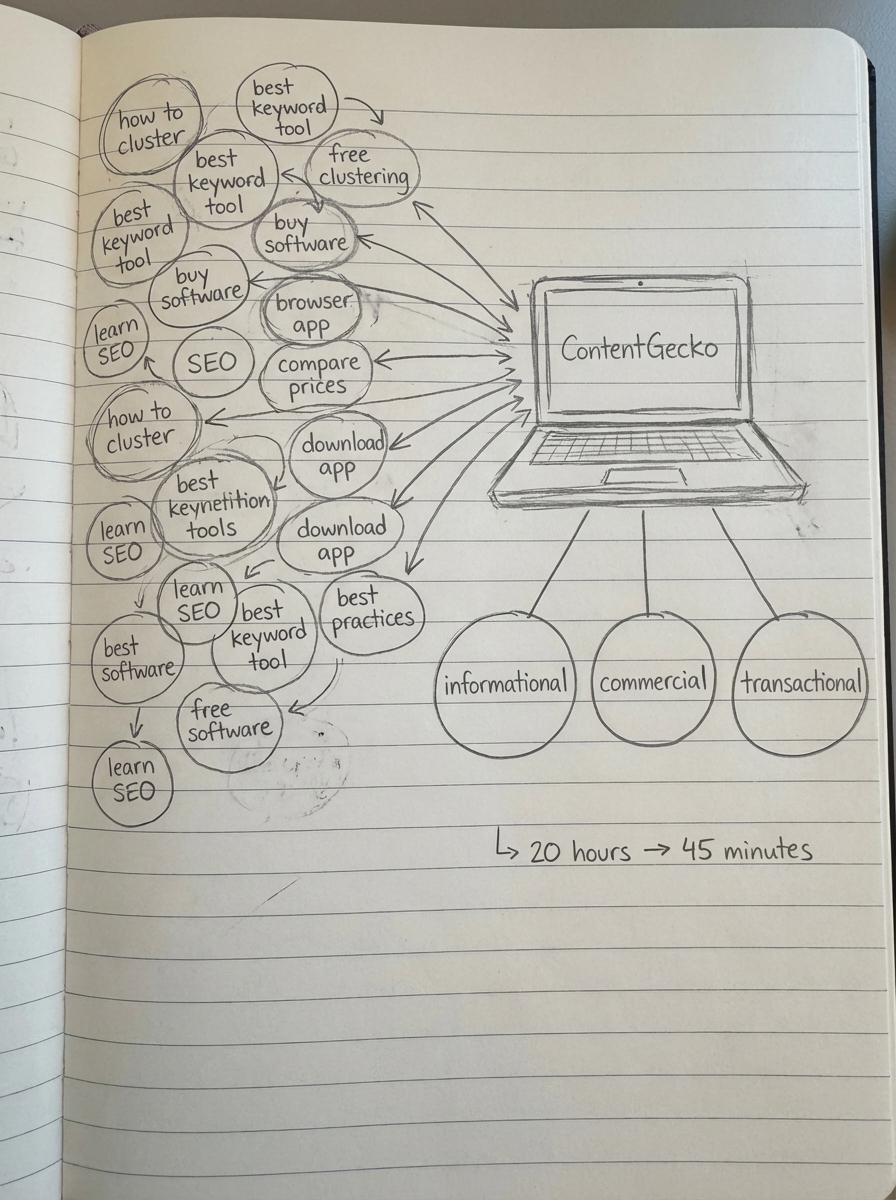
ContentGecko syncs directly with your WooCommerce catalog via the WordPress connector plugin, analyzes your product taxonomy and creates intent-mapped content plans. The platform identifies informational queries (“how to choose X”), maps them to relevant category and product pages, and generates catalog-aware blog content that links naturally to your inventory.
The advantage: automatic updates. When products change – pricing, availability, new SKUs – ContentGecko updates the content and maintains schema accuracy. I’ve watched merchants waste weeks updating blog posts manually after a product line refresh. Automation eliminates that maintenance burden.
For keyword research, AI-powered keyword clustering processes thousands of keywords in minutes to avoid content overlap and target specific user intent. The platform analyzes which page types Google favors for each cluster, then matches that insight to your existing categories, products, or blog content gaps. An e-commerce retailer using intent-based clustering saw a 43% increase in organic traffic and a 27% rise in qualified leads.
The free AI SEO content writer creates optimized content by analyzing search results, understanding intent, researching facts from reliable sources, and writing comprehensive content with proper citations. Unlike generic AI tools, it’s built specifically for ecommerce – it understands product catalogs, category structures, and conversion optimization.
Track performance with ContentGecko’s ecommerce SEO dashboard, which breaks metrics down by page type. You can see whether your category pages are getting indexed properly, if product pages are attracting the right keywords, and how blog content performs. This visibility reveals optimization opportunities that generic analytics tools miss.
The objection I anticipate: “Can’t I just use ChatGPT or Claude?” You can, but you’ll spend hours prompting, fact-checking, and manually syncing to your catalog. Generic AI requires heavy editorial oversight. ContentGecko automates the research, writing, schema implementation, and catalog synchronization – it’s built for WooCommerce at scale. See case studies for real results from WooCommerce merchants.
Common keyword intent mistakes WooCommerce merchants make
Mistake 1: Targeting informational keywords with product pages. I see this constantly – merchants optimize product pages for “how to” queries and wonder why bounce rates are 80%+. Someone searching “how to set up a home gym” isn’t ready to buy your specific bench press model. Create a blog post that answers the question, then link to your home gym equipment category.
Mistake 2: Ignoring commercial intent entirely. Many stores only optimize products and blog posts, leaving category pages as thin product lists with zero SEO value. Commercial-intent queries like “best budget laptops” or “top-rated hiking boots” should land on optimized categories, not product pages or blog posts. Optimizing category and collection pages targeting broader product themes captures additional SERP features including organic listings and featured snippets.
Mistake 3: Creating one piece of content per keyword. Intent isn’t binary – “running shoes” can signal both commercial (comparing options) and transactional (ready to buy) intent. Address both by ranking your category page for the commercial query and individual product pages for brand-specific transactional queries. Some keywords satisfy multiple intents and require content for each.
Mistake 4: Neglecting zero-result internal search queries. Your site search is a direct intent signal. If 200 people per month search “vegan protein powder” on your site and find nothing, you’re losing sales to competitors. Export search analytics, prioritize high-volume terms, and create category pages or products to capture that demand. Tracking zero-result queries is a critical content gap indicator.
Mistake 5: Keyword stuffing transactional pages. Product pages need keyword optimization, but cramming “best cheap wireless headphones under $50 free shipping” into your title tanks conversions. Transactional intent searches are often long-tail and specific – optimize for the model number and primary descriptor, then let schema and reviews handle the rest. In 2025, contextual relevance matters more than keyword density.
Mistake 6: Building content for search engines, not LLMs. 58% of consumers now use generative AI for product recommendations, with traditional search use projected to decline by 25% by 2026. LLM search is projected to drive 75% of revenue by 2028. Optimize for both – use structured data, natural language, and comprehensive answers that LLMs can parse and cite. Keyword clustering allows creation of comprehensive resources that address related search intents holistically – something both traditional search engines and AI models reward.
Measuring the ROI of intent-led keyword strategy
Track three metrics: organic traffic by page type, conversion rate by intent segment, and revenue per keyword cluster.
Organic traffic by page type reveals whether you’re attracting the right mix. Use ContentGecko’s SEO dashboard to segment by categories, products, and blog posts. If blog traffic grows but product/category traffic stagnates, your informational content isn’t driving qualified traffic down-funnel. Fix internal linking and add more commercial/transactional content.
Conversion rate by intent segment exposes misalignment. In Google Analytics, create segments for users who land on blog posts vs. category pages vs. product pages. Blog traffic should convert at 2-5%, category traffic at 8-15%, and product page traffic at 15-25%. If your numbers are inverted, you’re targeting the wrong intent or optimizing pages incorrectly.
Revenue per keyword cluster shows ROI at the granular level. Tag each piece of content with its target keyword cluster (use UTM parameters or custom dimensions), then calculate revenue attributed to that cluster over 90 days. You’ll quickly see which intent-mapped clusters drive revenue and which waste resources. I’ve seen stores discover that 10 informational blog posts drive more revenue than 50 thin category pages because the blog content targets early-stage buyers who convert at higher lifetime value.
Use Google Search Console to monitor which queries drive impressions vs. clicks vs. conversions. Filter by page type – if your product pages get high impressions but low clicks, optimize title tags and schema for transactional appeal. If category pages get clicks but high bounce rates, add comparison frameworks and filtering options.
For long-term tracking, measure keyword cannibalization. If multiple pages compete for the same query, consolidate or differentiate. SERP-based clustering prevents this proactively by grouping related keywords before content creation.
The outcome I’ve observed across WooCommerce stores: intent-led keyword strategy increases qualified traffic by 30-50% and organic conversion rates by 15-25% within six months. But only if you commit to the process – map queries to the right page types, optimize for the specific intent signals, and eliminate content that serves neither search engines nor buyers. Read more in our blog for ongoing tactics and case studies for real-world results.
TL;DR
Keyword intent determines whether searchers want to learn, compare, or buy. Map informational queries to blog posts, commercial intent to category pages, and transactional intent to product pages. Use SERP-based clustering to group keywords by intent, optimize on-page elements for each intent type, and track performance by page type to measure ROI. Automation via ContentGecko eliminates manual keyword research and keeps content aligned with your WooCommerce catalog at scale.