


Most WooCommerce merchants install an SEO plugin, tweak a few settings, and assume they’re done. Traditional SEO plugins solve one piece of the puzzle – on-page optimization – while leaving catalog management, content creation, and ongoing maintenance entirely manual.

I’ve tested every major WooCommerce SEO plugin over the past three years running stores from 200 to 15,000 SKUs. The right tool depends on your catalog size, technical resources, and whether you’re optimizing existing pages or building a content engine that drives qualified traffic.
Why WooCommerce stores need specialized SEO tools
Generic WordPress SEO plugins don’t understand product variations, inventory changes, or category hierarchies. Your store needs tools that handle structured data for products – including Product schema, Offer entities, and AggregateRating markup that triggers rich results in Google. Prices, stock status, and SKUs change constantly, and your SEO should update automatically. Most stores use vague category names that miss search intent, and product images need descriptive filenames, alt text, and compression that becomes unmanageable past 500 SKUs without automation.
The traditional approach – installing Yoast or Rank Math and manually optimizing each page – works for small catalogs. It breaks down when you’re managing thousands of products and need content that actually drives conversions.
Best WooCommerce SEO plugins compared
Yoast WooCommerce SEO
Yoast remains the default choice because it’s familiar and integrates directly with WooCommerce. The WooCommerce add-on overrides WooCommerce’s default schema markup and adds Product schema with proper structured data.
Yoast delivers reliable schema implementation for products and handles breadcrumb navigation and XML sitemaps automatically. Bulk editing for meta descriptions via CSV export saves time on initial optimization. The interface is beginner-friendly, which explains its popularity among merchants new to SEO.
The problems surface as your catalog grows. I’ve seen Yoast cause admin slowdowns on stores with 8,000+ products because it processes all product metadata on every page load. Performance issues start appearing around 5,000 products. AI features are locked behind the Premium tier, and there’s no automated content updates when product data changes. If you’re running a large catalog, monitor your Time to First Byte (TTFB) in Google Search Console.
Rank Math (Free and PRO)
Rank Math handles larger catalogs better than Yoast and includes WooCommerce features in the free version. The PRO version adds GTIN/MPN implementation for variations and improved variation product schema with Offer entities.
Rank Math can remove the category base from product URLs, shortening them for improved search results – a simple change that meaningfully improves WooCommerce URL structure. The plugin is documented to handle catalogs up to 20,000+ products with proper server resources. It automates schema markup that helps products show up with star ratings and prices in Google search results, and the free version includes essential WooCommerce features that competitors lock behind paid tiers.
One feature I use constantly: Rank Math can remove schema markup on shop archive pages, aligning with Google’s recommendation against using schema on category listing pages. This prevents structured data errors that would otherwise require manual cleanup.
Schema customization requires PRO ($59/year), and you’ll still need to manually optimize individual products. But for stores between 500 and 10,000 SKUs, Rank Math offers the best balance of features, performance, and cost.
All in One SEO (AIOSEO)
AIOSEO focuses on scalability. It handles catalogs up to 50,000 products with adequate server resources and includes dynamic tags that pull product data automatically.
The dynamic product variables – price, SKU, availability – insert automatically into meta descriptions and titles. Instead of manually writing thousands of unique meta descriptions, you create templates that populate from product fields. AIOSEO includes a guided wizard for 20+ schema types plus custom schema options. Performance on large catalogs exceeds Yoast’s by a meaningful margin.
The trade-off is fewer WooCommerce-specific features than Rank Math. Schema features require the PRO plan. But if you’re managing an enterprise catalog and need a plugin that won’t slow your admin panel to a crawl, AIOSEO deserves serious consideration.
SEOPress
SEOPress offers a middle ground: cleaner interface than Rank Math, better performance than Yoast, and a reasonable price point.
The plugin is white-label ready with no branding, which matters if you’re an agency. Structured data implementation is solid and reliable. It strikes a good balance between features and performance without overwhelming new users.
The smaller community means fewer integrations and less third-party support than competitors. WooCommerce features are less comprehensive than Rank Math’s. I recommend SEOPress for agencies managing multiple client stores who need clean dashboards and white-label reporting.
Specialized WooCommerce schema plugins
If you’re using a basic SEO plugin and need enhanced structured data, these add-ons fill the gap.
Schema Pro
Schema Pro works alongside any SEO plugin and adds automation to map schema types to existing posts and pages. It supports custom schema in JSON-LD format for advanced users. Pricing starts at $79/year.
Schema Pro is best for stores needing advanced schema – HowTo, FAQ, VideoObject – beyond basic Product markup. If you’re publishing tutorials, video content, or detailed buying guides, Schema Pro layers additional structured data on top of your core SEO plugin without conflicts.
Schema & Structured Data for WP
This plugin offers 35 schema types including LocalBusiness, Recipe, and Product. It includes Google reviews integration to boost product visibility and has a WooCommerce Compatibility plugin upgrade supporting membership, bookings, and YITH WooCommerce Advanced Reviews.
It’s best for multi-format sites – blog plus store plus local business – that need diverse schema types managed from a single interface. The breadth of schema support makes it useful for complex implementations.
WPSSO Core
WPSSO supports 13 types of schema markup with no coding required. It’s lightweight, technically solid, and compatible with all post types.
Developers who want granular schema control without plugin bloat should consider WPSSO. It follows Schema.org standards closely and outputs clean JSON-LD without the interface complexity of larger plugins.
The problem traditional plugins don’t solve
Here’s what I learned managing a 12,000-product outdoor gear store: SEO plugins optimize what you have, but they don’t create the content that drives organic traffic.
Your product pages capture branded searches and bottom-funnel buyers. To grow organic traffic, you need informational content – how-to guides, comparison articles, buying guides – that targets high-volume keywords and introduces your products to new audiences.
Traditional SEO plugins offer schema markup, meta optimization, and technical SEO basics. They don’t plan content, automate writing, sync with your catalog, or provide ongoing content updates. I spent 11 hours every week writing blog posts, updating product links when SKUs changed, and manually fixing broken internal links. That time should have been spent on merchandising and customer acquisition.
The stores I’ve worked with that rely solely on product page optimization hit a traffic ceiling within 6-12 months. You need a different approach once you’ve optimized your existing pages.
When to use a content platform instead
If you’re running a catalog over 500 SKUs and want to build organic traffic beyond your existing product pages, traditional plugins become a bottleneck.
ContentGecko for WooCommerce
ContentGecko is a fully automated SEO content platform built specifically for WooCommerce stores. Instead of optimizing pages you already have, it plans, writes, publishes, and continuously updates a catalog-aware blog.
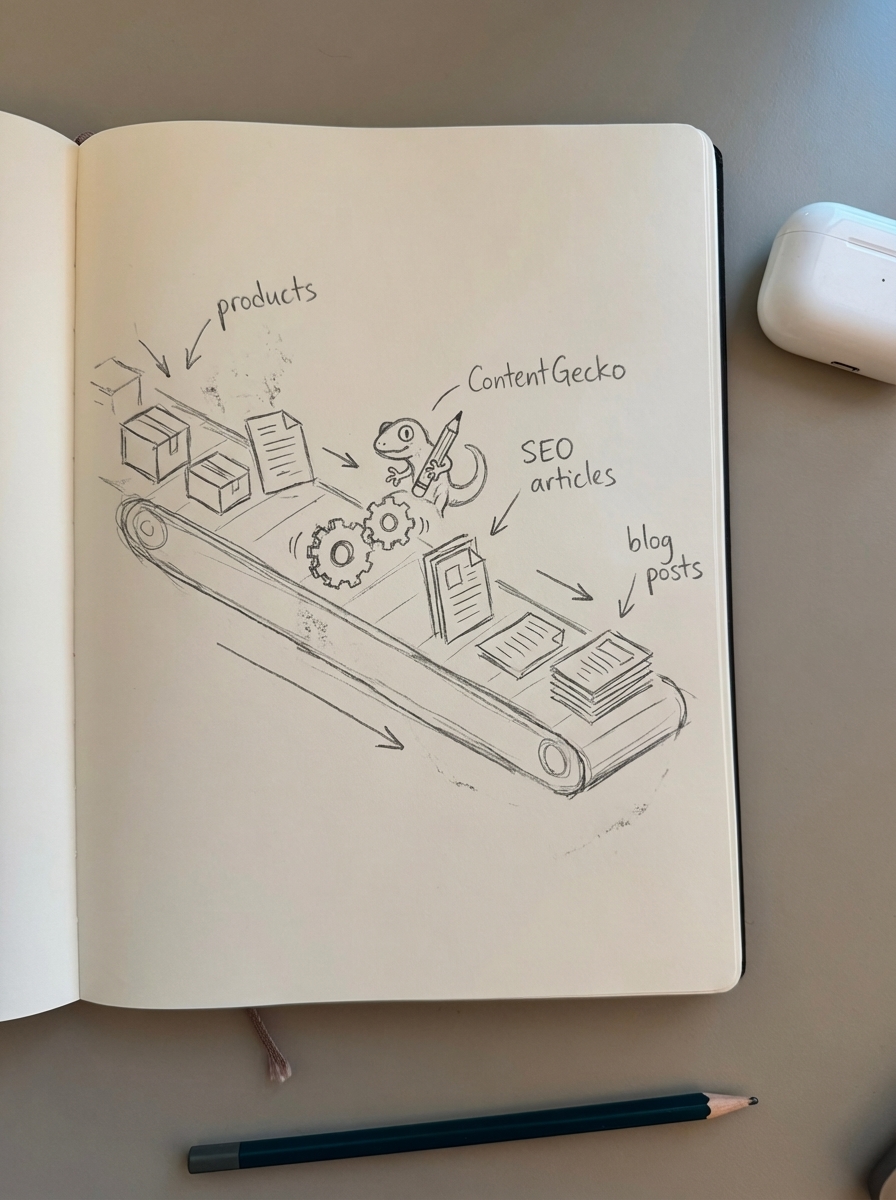
The WordPress connector plugin syncs your product data, categories, and inventory via secure API. AI analyzes your catalog and plans articles – how-tos, listicles, buyer guides – targeting keywords your products can rank for. Articles publish automatically with product images, internal links to categories, and proper schema markup. When prices, SKUs, or stock status changes, ContentGecko updates all referencing blog posts automatically.
Traditional SEO plugins treat products and content as separate entities. ContentGecko understands your catalog and creates content that drives conversions, not just traffic.
For example: You sell hiking boots. ContentGecko identifies that “best hiking boots for beginners” gets 8,900 searches per month. It writes a comprehensive buyer’s guide, embeds your specific boot models with current prices and images, adds Product schema, and publishes it with proper breadcrumb structure. Six months later, one of your featured boots goes out of stock. ContentGecko automatically removes it from the article and replaces it with an in-stock alternative. No manual edits required.
ContentGecko makes sense for catalogs over 500 SKUs where manual content becomes unscalable, stores with frequent inventory changes like fashion or seasonal goods, merchants who want to rank for informational keywords but don’t have time to maintain a blog, and teams without dedicated content writers or SEO specialists.
Stick with traditional plugins for small catalogs under 200 products where manual optimization is manageable, stores with static inventory that rarely changes, brands with existing content teams who just need technical optimization, and budget-conscious stores that can invest time instead of automation.
I’ve seen stores increase organic traffic by 3-4x within six months using ContentGecko because they’re suddenly ranking for hundreds of informational keywords they never targeted before. The ecommerce SEO dashboard breaks down performance by page type so you can see exactly which categories, products, and blog posts drive results.
Complementary tools for WooCommerce SEO
Beyond core optimization, these tools solve specific problems that plugins don’t address.
Keyword research and clustering
The free SERP keyword clustering tool groups keywords by search result similarity. This prevents you from creating multiple pages targeting the same search intent – a common mistake that causes cannibalization.
I use this when planning category structure. If “running shoes” and “athletic shoes” return 80%+ overlapping SERPs, they should map to one category, not two. Clustering reveals which keyword variations deserve dedicated pages versus which should consolidate.
Category optimization
Most ecommerce stores use vague category names. The free category optimizer analyzes your store and suggests optimized titles that are more specific and buyer-friendly. This is often a quick win for visibility and conversions because buyers can actually find what they’re looking for.
Image optimization
Product images account for 61.3% of page download time according to HTTP Archive data. Use ShortPixel or Imagify for bulk compression. For stores over 1,000 products, automated image optimization becomes essential – manually optimizing thousands of images isn’t realistic. The WooCommerce product image generator can create lifestyle photos at scale, and tools that automate image SEO generate proper alt text automatically.
Faceted navigation management
If you use product filters for size, color, or brand, you need a strategy to avoid crawl budget waste and index bloat. Plugins like WOOF or FacetWP handle the frontend filtering. You need to configure indexing controls, canonicalization, and robots.txt rules manually – or use a platform that handles faceted navigation SEO automatically.
Enterprise stores can waste up to 70% of their crawl budget on low-value faceted URLs. Proper implementation requires deciding which filter combinations to index, which to noindex but allow crawling, and which to block entirely.
Implementation roadmap by store size
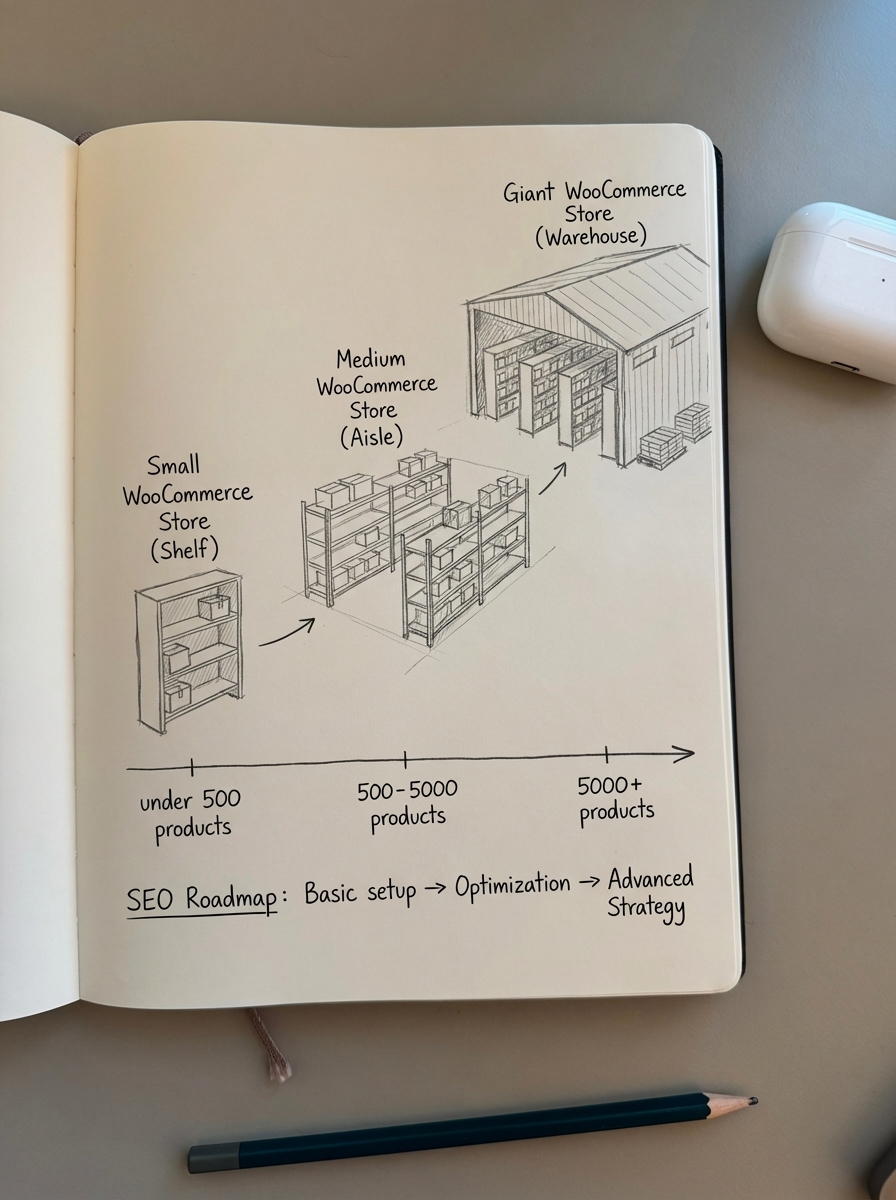
Small stores (under 500 products)
Use Rank Math free version plus manual optimization. Install Rank Math, use ShortPixel for image compression, and handle blog writing manually or with freelance writers. Expect to invest 5-8 hours per week for content and optimization. This approach is cost-effective when your catalog is small enough that manual work remains feasible.
Growing stores (500-5,000 products)
Use Rank Math PRO or AIOSEO plus semi-automated workflows. Implement template-based meta descriptions using dynamic tags so you’re not writing thousands of unique descriptions. Consider the ContentGecko Starter plan for automated blog content and run the free category optimizer to identify quick wins in your taxonomy. Time investment drops to 3-4 hours per week with automation.
Large catalogs (5,000+ products)
Use ContentGecko plus a lightweight SEO plugin for technical optimization. Combine ContentGecko Professional or Enterprise with Rank Math or SEOPress for technical SEO. Implement a CDN for image delivery and monitor performance through the ecommerce SEO dashboard. Time investment falls to 1-2 hours per week reviewing reports and approving content plans.
The inflection point is around 1,000 products. Below that threshold, manual optimization is feasible if tedious. Above it, you need automation or a dedicated SEO team to maintain content quality and keep product links current.
Common objections and real answers
“I don’t need more content, I need my products to rank.”
Your products will only rank for branded searches and very specific long-tail queries. To grow organic traffic beyond existing brand awareness, you need informational content that introduces your products to new audiences. The stores I’ve worked with that rely solely on product page optimization hit a traffic ceiling within 6-12 months. Content targeting “how to choose hiking boots” ranks for a 8,900-search-per-month keyword and introduces your boots to buyers who’ve never heard of your brand.
“AI content is spam and Google will penalize it.”
Google explicitly states: “AI-generated content is spam only when created solely to manipulate search rankings.” Quality AI content for WooCommerce SEO that serves user intent and includes proper fact-checking is indistinguishable from human writing and performs identically in search. The key is whether content helps users or exists only to manipulate rankings.
“My products change too frequently for content to stay accurate.”
That’s exactly why automation matters. ContentGecko monitors your catalog and updates content when products change. Traditional plugins and manual content become inaccurate the moment a product goes out of stock or a price changes. Automation isn’t a luxury for high-churn catalogs – it’s a requirement.
“I tried SEO before and it didn’t work.”
Most WooCommerce merchants optimize product pages, see minimal results, and give up. Product page optimization is necessary but not sufficient. You need content targeting informational keywords at the top and middle of the funnel. Use the free AI writer to test the content quality before committing to a paid plan.
TL;DR
Rank Math – free or PRO – offers the best balance of features and performance for most WooCommerce stores. It handles structured data, URL optimization, and sitemaps without the performance overhead of Yoast.
For stores under 500 products, stick with a traditional plugin and manually optimize high-priority pages. Use the category optimizer to identify quick wins.
For growing stores that need organic traffic beyond product pages, ContentGecko builds a catalog-aware blog that targets informational keywords and drives qualified traffic. Traditional plugins optimize what you have; ContentGecko creates the content that actually drives growth.
For large catalogs exceeding 5,000 products, automation isn’t optional. Manual optimization becomes unscalable and outdated immediately. Use ContentGecko for content and a lightweight plugin like Rank Math or SEOPress for technical SEO.
Start by auditing your current organic traffic sources. If 80%+ comes from branded searches and existing customers, you need a content strategy beyond product page optimization.