


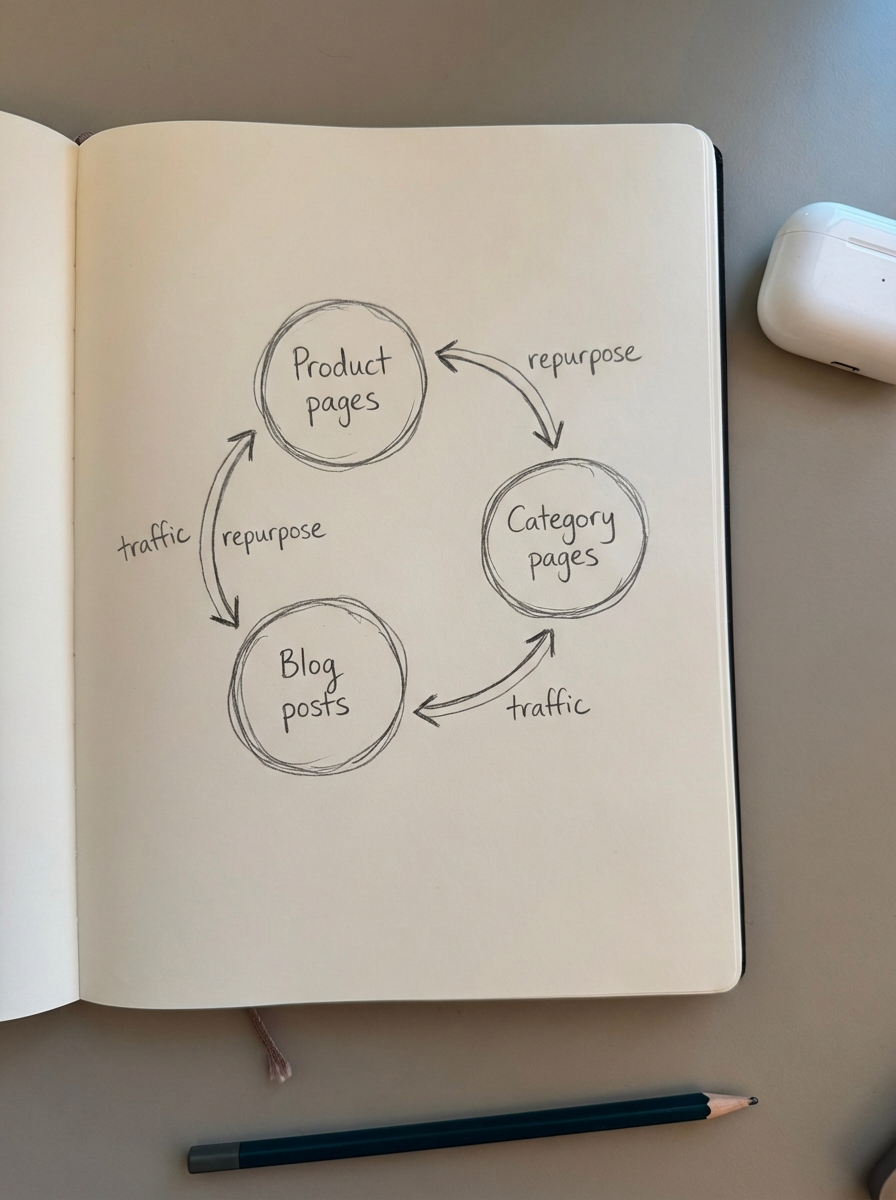
Most WooCommerce stores waste 90% of the value of their existing assets by treating content production as a linear treadmill rather than a circular ecosystem. To scale organic traffic without linearly scaling your budget, you must transition from a “publish and pray” model to a systematic content repurposing workflow. This approach treats every product description, category page, and blog post as a seed for multiple channel-specific assets, ensuring you aren’t starting from scratch every Monday morning.
The economics of systematic repurposing
Content production is an expensive capital investment. If you are paying for high-quality research, subject matter expert interviews, or deep SEO analysis, using that output for a single blog post is a poor use of your marketing budget. Systematic repurposing allows you to extract 5x to 10x the value from every original dollar spent by slicing a single asset into various formats.
I have found that the primary bottleneck in scaling is usually “blank page syndrome.” By starting with existing data – like sales trends from a top-performing category or frequently asked questions on a product page – you eliminate the most difficult part of the content production workflow. This shift in perspective transforms your content strategy from a series of isolated tasks into a repeatable production line.
Beyond efficiency, repurposing solves the reach problem. Some users live in their email inboxes, while others search exclusively via Google or discover products through social feeds. If your best buying guide only exists as a long-form article, you are missing entire segments of your audience. For example, original research on industry trends can generate dozens of backlinks, but it only gains maximum traction if it is sliced into bite-sized, shareable formats that social algorithms favor.
The ecommerce content audit: identifying reuse candidates
Before you can repurpose, you need a clear inventory of your current assets. A manual audit is impossible for stores with thousands of SKUs, so I recommend using an ecommerce SEO dashboard to segment your pages by type and performance. This data-driven approach helps you identify which pages actually deserve your attention.
When performing your SEO content audit, I suggest categorizing your assets into four distinct buckets to prioritize your efforts.
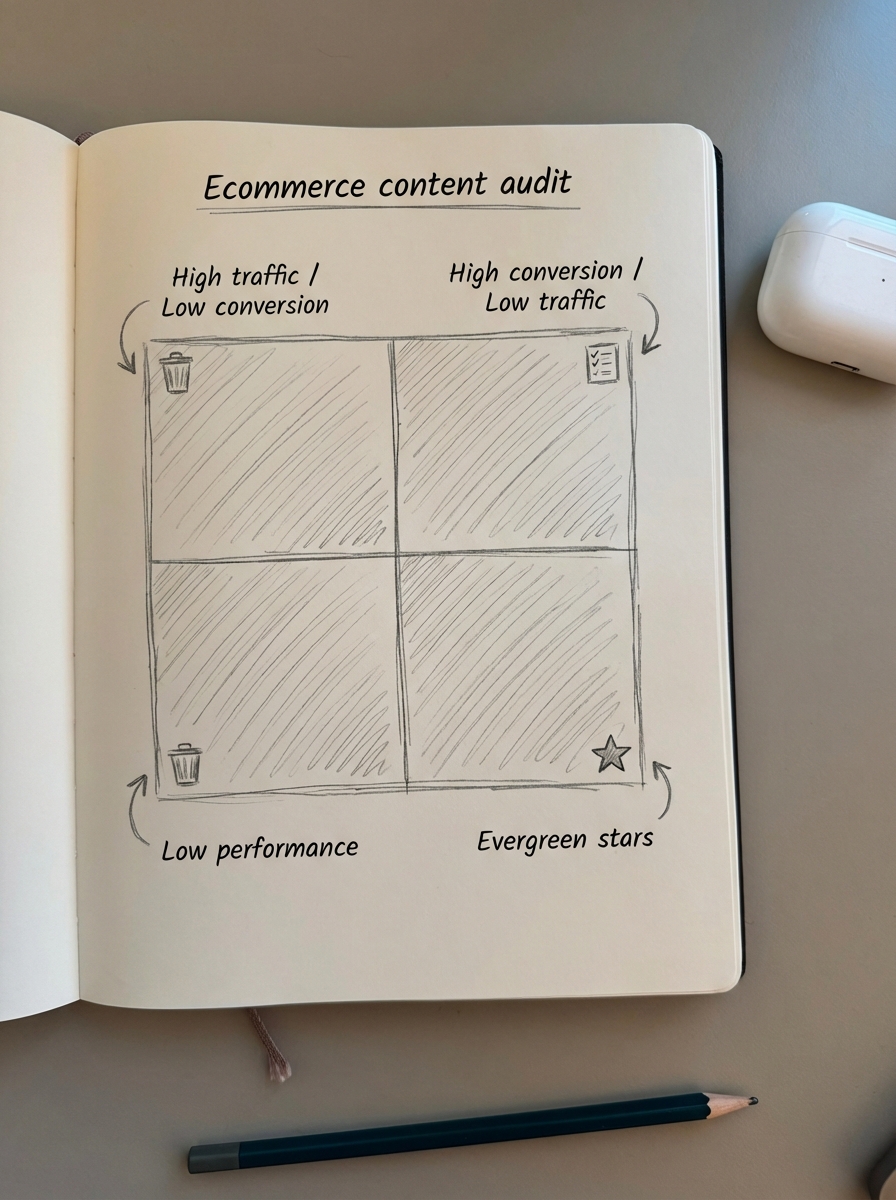
- High Traffic / Low Conversion: These are informational blog posts or broad categories that attract eyeballs but fail to close the sale. Repurpose these into decision-stage assets like buyer checklists or downloadable “cheat sheets” to capture leads.
- High Conversion / Low Traffic: These are your high-intent product pages or niche categories that convert well but lack visibility. Repurpose their technical specifications into “how-to” guides or comparison listicles to drive more top-of-funnel awareness.
- Low Performance: These assets represent your content production bottlenecks. Consolidate or remove these pages to prevent site bloat, which remains the most common technical SEO mistake in ecommerce.
- Evergreen Stars: These are your best-performing assets. They belong in a permanent repurposing loop, such as turning a top category page into an annual “Best of” guide for your niche.
Repurposing recipes for WooCommerce
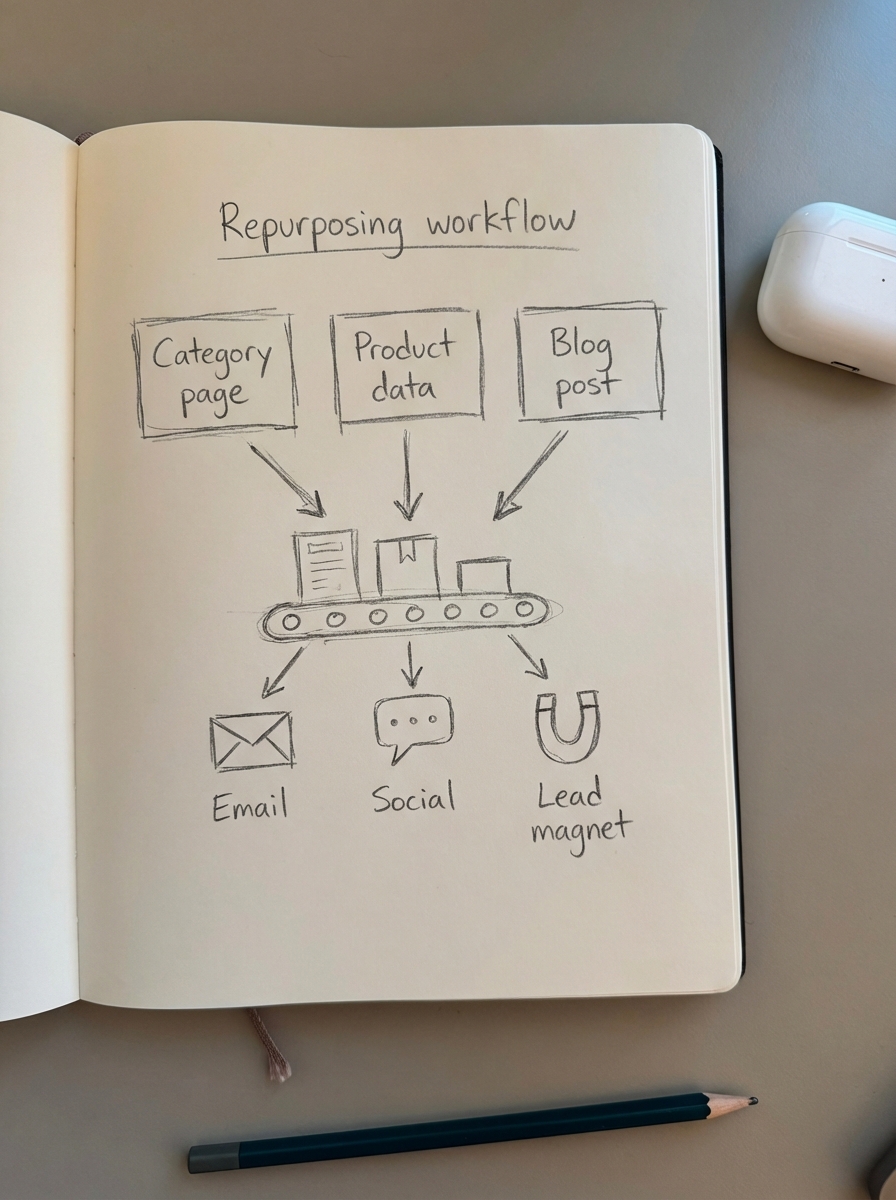
A “recipe” is a standardized transformation of one content type into another. These workflows ensure that your team spends less time thinking about what to create and more time executing on proven formats. Here are the three most effective recipes for WooCommerce marketers.
Category pages to educational hubs
Most ecommerce sites use vague category names that do nothing for SEO. By optimizing category names and adding several hundred words of contextual copy, you create a foundation for broader authority. The best recipe here is to take the best-sellers within a category and the top three problems solved by those products, then transform that data into a “Buying Guide” blog post. Category pages often rank for high-intent keywords but suffer from high bounce rates; contextual blog posts capture users who aren’t quite ready to click “Add to Cart” but are actively researching.
Product data to FAQ and social proof
Product pages are goldmines of technical data and customer sentiment. I recommend aggregating the most common questions from your product Q&A or customer support tickets and using them to build an FAQ section on the product page using schema markup. You can then turn each question into a standalone “Quick Tip” social post or an email newsletter snippet. This approach answers the exact objections preventing conversions while simultaneously capturing long-tail search volume.
Blog posts to catalog-aware sales tools
Don’t just write “thought leadership” content; it rarely moves the needle for ecommerce SEO. Instead, produce a catalog-aware blog that links directly to your inventory. One effective recipe involves taking a long-form “how-to” guide and stripping the headers to create a checklist lead magnet. You should also extract the product mentions to create a “Related Products” widget on your site. This creates a cohesive internal linking structure that passes authority from your high-ranking blog content down to your product and category pages.
Managing technical blockers in WooCommerce
The biggest risk in repurposing is creating a “bloated” website with duplicate pages or confusing URL structures. When you repurpose product descriptions for a blog post, you must add significant unique value, such as personal experience or comparison context, rather than just copy-pasting text.
If you create multiple variants of a page for different marketing campaigns, always use canonical tags to tell Google which one is the “Source of Truth.” Furthermore, there is nothing worse for user experience than a repurposed blog post driving traffic to “Out of Stock” products. This is where automation becomes mandatory; you need a system that checks your WooCommerce REST API and only promotes items that are in stock or on backorder.
Scaling the workflow with AI and automation
Doing this manually for thousands of products is an impossible task. AI has disrupted the cost of production for these variants, making it viable for small teams to compete with enterprise giants. I use a hybrid approach to scaling content production with automation that combines strategic oversight with machine efficiency.
- Ideation: Use keyword clustering to find groups of related products that should be featured in a single repurposed article.
- Drafting: Use an AI SEO writer to take your category data and product specs and turn them into a comprehensive first draft that follows your brand voice.
- Visuals: Use a product image generator to create lifestyle variants of your product shots to suit different social platforms without the need for a new photoshoot.
- Publishing: Use a WordPress connector plugin to sync these assets directly from your planning tool to your store, ensuring metadata and internal links are handled automatically.
TL;DR
- Stop treating content as a one-off task and build a loop where product data fuels category content, which then informs your blog topics.
- Focus on optimizing category names first, as these are the highest-leverage pages in your store.
- Use AI to handle the manual heavy lifting of creating content variants while maintaining a strict content quality assurance process.
- Efficiency in ecommerce SEO isn’t about writing more; it’s about making what you have already written work ten times harder.