


Third-party keyword tools are fundamentally broken for niche software markets because their databases are too small and update too slowly to capture real-time intent or emerging technical trends. To win in a specialized software niche, you must stop treating “estimated volume” as gospel and start using the Search Engine Results Page (SERP) as your primary source of truth.
When I first started consulting for WooCommerce plugin developers, I noticed a recurring pattern: they would ignore high-intent keywords because a popular SEO tool claimed the search volume was “0.” Months later, a competitor would publish a guide on that exact topic and capture hundreds of qualified leads a month. The tool wasn’t just wrong; it was a liability. For software stores, the goal isn’t to find the highest volume; it’s to find the highest keyword intent that aligns with your software’s specific capabilities.

The failure of third-party keyword data in software niches
Most ecommerce SEO leads rely on popular tools to tell them what to write. In the software world – especially for niche WooCommerce extensions or SaaS products – this data is often off by a factor of ten. These tools use clickstream data and historical patterns that struggle to keep up with how developers and CTOs actually search.
Software trends move faster than a scraper can update. By the time a “trending” software term shows up with significant volume in your SEO tool, the early-mover advantage has vanished. Instead of chasing these lagging indicators, I prioritize long-tail keywords and “zero-volume” terms that represent specific technical problems. If a keyword like “integrate WooCommerce with niche ERP [X]” has zero volume according to your tool, but your support team gets three tickets about it a week, that is a high-value keyword. I believe that if you think an article would benefit your users, you should publish it regardless of what a third-party tool says.
How to find niche keywords without over-relying on tools
Effective niche keyword research for software requires looking at your own ecosystem first rather than external databases.
Mine your first-party data
Your most valuable keywords are already sitting in your Google Search Console account. Look for queries where you have high impressions but low click-through rates (CTR). These are often “near-miss” opportunities where users are looking for a specific software solution, but your current page title or content doesn’t quite hit the mark.
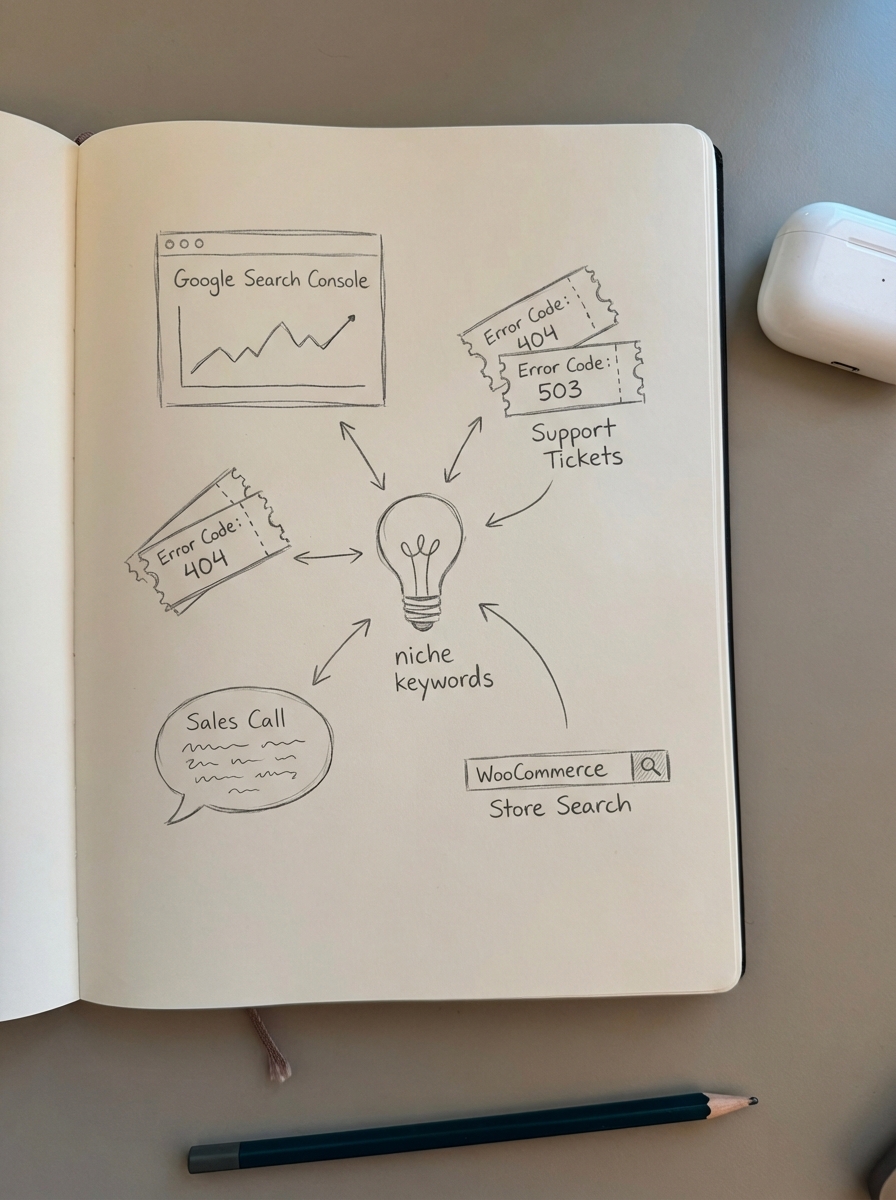
Beyond Search Console, I look at internal data points like support tickets, where users mention specific error codes or integration hurdles. I also review sales calls to capture the exact language of your prospects, which is almost always more effective than industry jargon. Finally, I check internal site search logs to see what users are typing into your store’s search bar, which provides a direct pipeline into what your catalog is currently missing.
Perform a competitor keyword gap analysis
In the software niche, you don’t just compete with other stores; you compete with documentation sites, GitHub repositories, and Stack Overflow threads. A competitor keyword gap analysis should identify topics where competitors have thin or outdated content. If a competitor ranks for “best WooCommerce recurring payments plugin” but their article is only a few hundred words of fluff, that is an easy target for a comprehensive technical guide.
Target zero search volume (ZSV) keywords
In software, ZSV keywords are often where the highest conversion happens because they represent hyper-specific queries. While the total audience for a query like “how to sync WooCommerce inventory with [Specific Software] API” might be small, 100% of that audience is looking for your exact solution. Advanced keyword research suggests that targeting these niches early establishes your authority before the topic becomes competitive or the tools catch up.
Analyzing intent and competition through the SERP
Once you have a list of potential terms, you need to judge whether you can rank and what type of page you should build based on the actual results Google provides.
The SERP-first clustering method
Don’t guess if you need a new page for every variation of a keyword. Use SERP-based keyword clustering to group queries that return similar results. If you search for “WooCommerce subscription plugin” and “WooCommerce recurring billing,” and the majority of the top results are identical, Google considers these to have the same intent. You only need one high-quality page to target both.
You can use our free SERP-based keyword clustering tool to automate this. It groups keywords by looking at real-time Google results, ensuring you don’t waste resources creating duplicate pages that will only compete with each other in the search results.
Determining the right page type
A common mistake in WooCommerce SEO is trying to rank a product page for an informational query. If the top results for “how to automate software license delivery” are all blog posts, your product page will never rank there. We find that the remaining opportunity for most stores is in producing a high-quality blog that supports their product catalog.
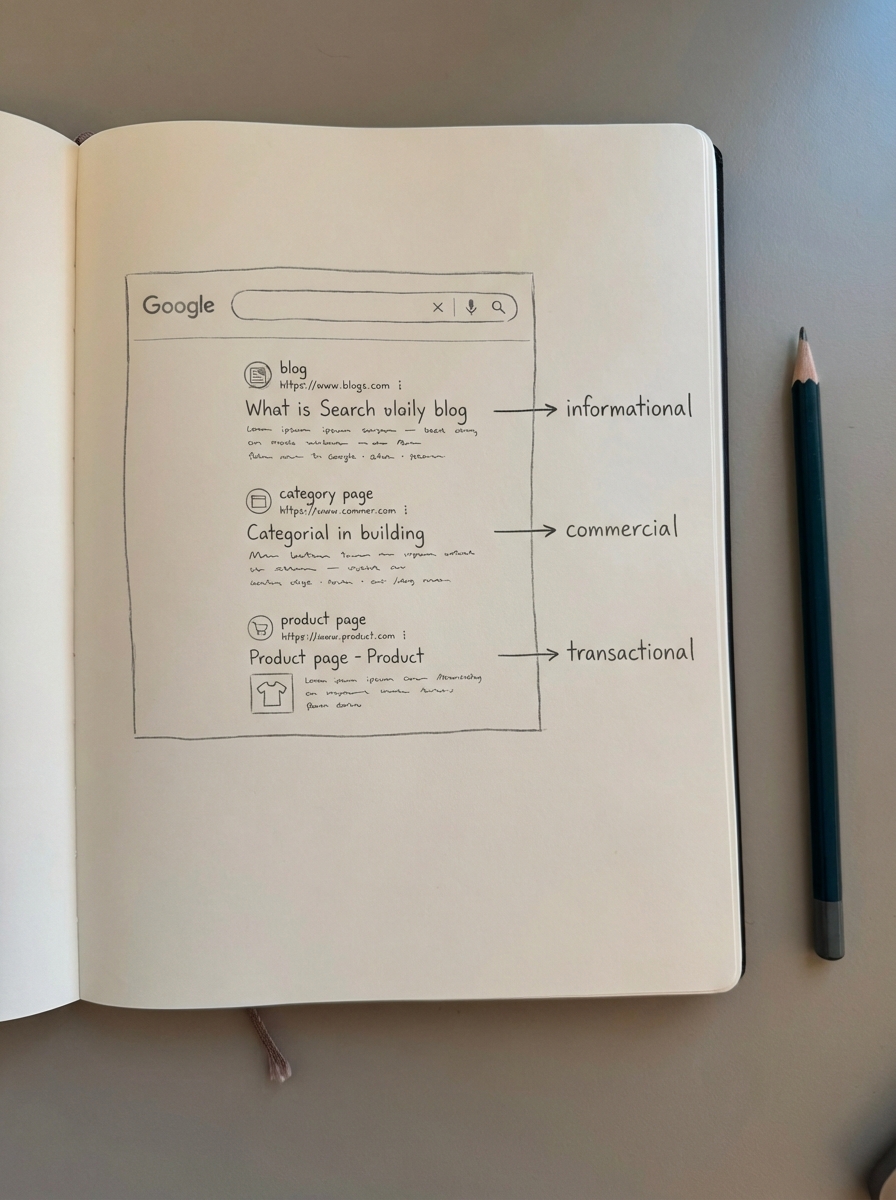
- Category pages should target commercial intent, such as “WooCommerce CRM Extensions.” Quantitative results show category pages drive the most transactional traffic because searchers want to compare multiple options before clicking a specific product.
- Blog posts are best for informational keywords like “how to set up a software marketplace.”
- Product pages are for the final transactional stage where the user knows exactly what they want, such as a specific plugin license key.
Selecting and implementing your keywords
When selecting keywords, look for low competition opportunities where the current ranking pages have outdated documentation or a poor user experience. Building content around these terms helps establish topical authority in niche areas that broader competitors might overlook.
The MVP content strategy
I recommend iterating content like you iterate software. Don’t spend weeks perfecting a massive guide for a keyword you aren’t sure about. Launch an MVP – a solid, AI-assisted article that covers the basic requirements – and monitor its performance. If it starts gaining impressions in our ecommerce SEO dashboard, then you should invest the human hours to make it the best resource on the web.
You can use our free AI SEO content writer to generate these initial drafts. It researches current facts and analyzes search results to ensure your content matches the topic clusters Google expects to see, allowing you to scale your content production without sacrificing the technical context required for software niches.
TL;DR
- Ignore tool volume and trust your first-party data, support tickets, and sales calls instead.
- Optimize category names for broad commercial intent as they often outperform individual product pages for revenue.
- Use the SERP as your guide: if Google shows blogs for a query, write a blog rather than trying to force a product page.
- Cluster keywords by intent using SERP overlap to avoid content cannibalization and build topical authority efficiently.
- Iterate quickly by launching MVP content for new keywords and only doubling down on topics that show real-world traction in your dashboard.