


A practical content strategy for WooCommerce is the bridge between search intent and category page revenue. I have spent years auditing ecommerce sites, and the most common failure I see is treating the blog as an isolated island of “lifestyle” content. In reality, your content should serve as a high-octane internal linking engine that powers your most important transactional pages.
Most store owners believe they need to act like a magazine editor, but for an ecommerce store, you are a solution provider. You don’t need content for the sake of content; you need a system that captures users at the top of the funnel (TOFU) and bridges them directly to your product catalog.
Why most ecommerce content strategies fail
I often see marketers spend thousands of dollars on “thought leadership” pieces that never rank because they lack topical authority. They target high-volume keywords with zero commercial intent or, worse, ignore the fact that Google treats ecommerce sites differently than publishers. If you are selling specialized gear, writing generic “top 10” lists without a clear path to purchase is a waste of your crawl budget.
In our view, the primary goal of a WooCommerce blog is to support your category pages. If a blog post doesn’t naturally link back to a product or a category, it likely doesn’t belong on your content calendar. We’ve found that optimizing category pages is significantly more impactful than focusing purely on individual product pages. Most websites have missing or broken hreflang setups and bloated architectures, but once you fix the basics, the remaining opportunity lies entirely in your blog.
The hub-and-spoke content template
The hub-and-spoke model is the gold standard for ecommerce SEO. You designate a “Hub” – typically one of your high-margin category pages – and surround it with “Spokes,” which are blog posts that answer every possible question a customer might have about that category.
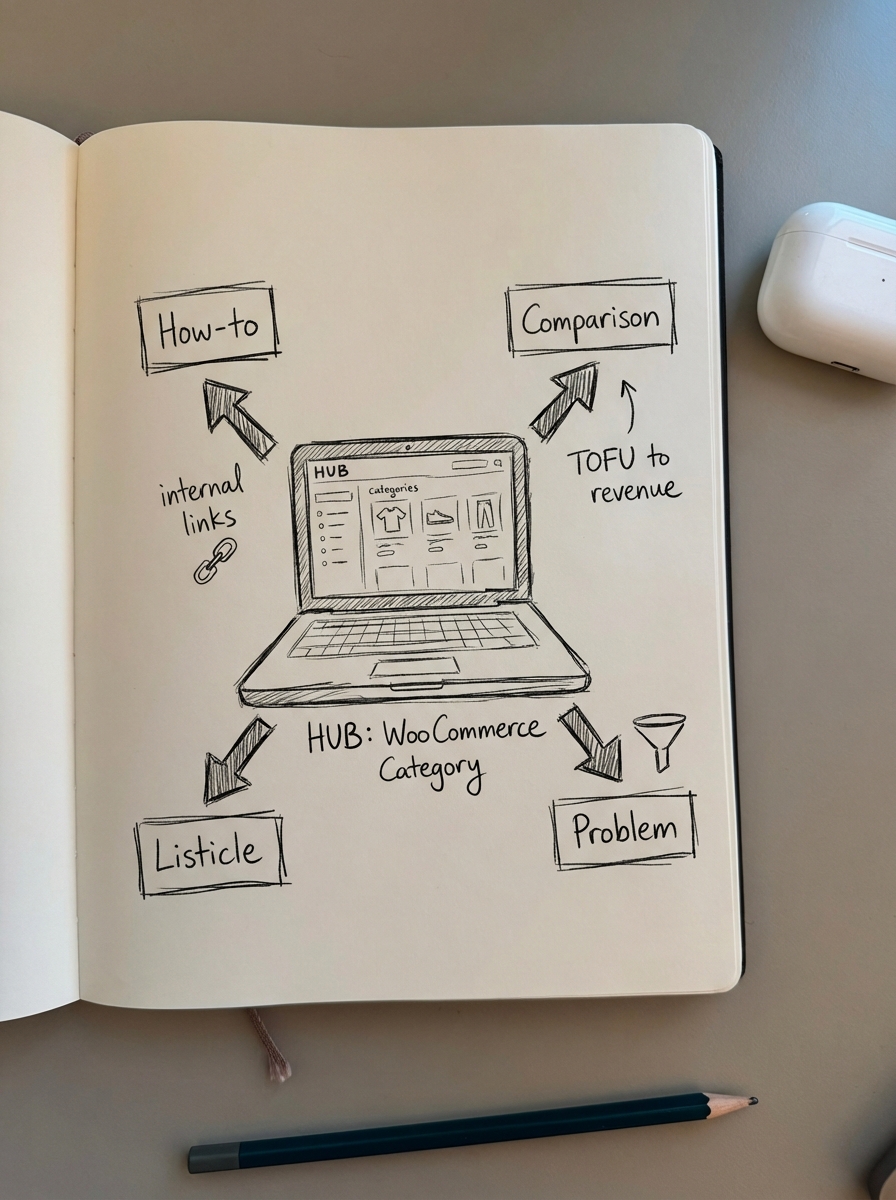
The “Yoga Equipment” example
- The Hub: Your main category page, such as
/product-category/yoga-mats/. - Spoke 1 (How-to): An article explaining how to clean a rubber yoga mat without damaging the grip.
- Spoke 2 (Comparison): A guide comparing yoga mat thicknesses (2mm vs 5mm vs 10mm) to help users decide based on their practice.
- Spoke 3 (Listicle): A roundup of the best yoga mats for hot yoga, specifically focusing on sweat-tested products from your inventory.
- Spoke 4 (Problem/Solution): A post addressing common user issues, like “Why does my yoga mat smell?” with actionable cleaning tips.
Each spoke article must link back to the main Hub using descriptive anchor text. This passes equity and signals to Google that your store is a comprehensive authority on the topic. We have observed that systematic internal linking can move a category page from the middle of the second page to the top of the first page.
The “Buyer’s Guide” strategy
Buyer’s guides are often the highest-converting informational content because they target users in the “Consideration” phase. These users are trying to narrow down their choices and are looking for expertise to guide their purchase.
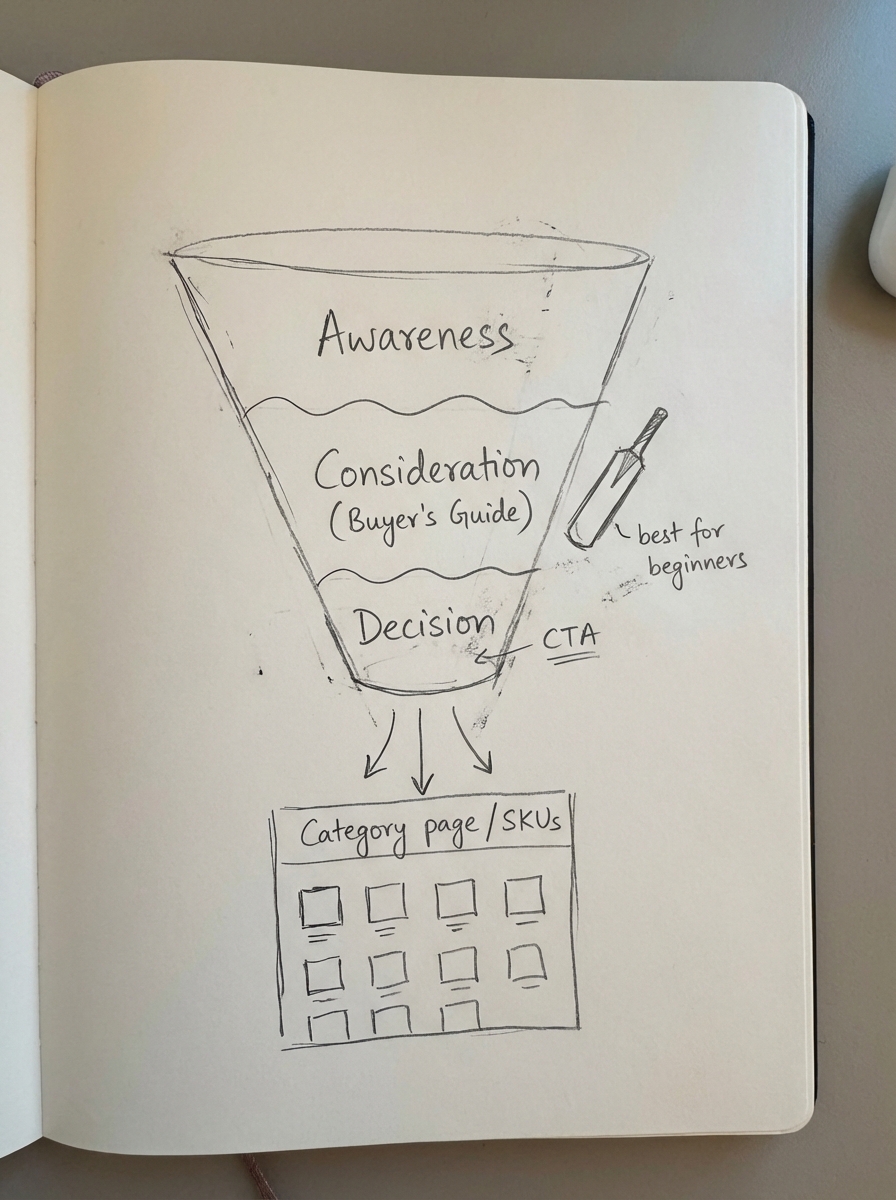
- The Hook: Acknowledge the complexity of the choice (e.g., “Choosing a cricket bat is harder than it looks”).
- The Technicals: Break down the attributes that matter, such as weight, willow grade, or the “sweet spot” of the equipment.
- The Persona Mapping: Create specific recommendations like “Best for beginners,” “Best for power hitters,” or “Best for budget-conscious players.”
- The CTA: Include direct links to your top-rated SKUs or the relevant category page.
I’ve seen this work incredibly well in practice. For instance, a UK-based cricket brand achieved over 200% organic growth by focusing on these long-tail guides. By targeting specific queries like “best cricket bat for beginners” rather than just high-competition terms, they generated over £20,000 in revenue from SEO alone. You can find similar success by documenting your unique product insights in our ecommerce case studies.
How to build your strategy: A practical process
- Group keywords by SERP similarity: Do not rely solely on search volume data, which is often inaccurate or too small to represent real opportunity. Instead, use keyword clustering to group related terms based on what Google actually shows. If “how to wash a yoga mat” and “cleaning yoga mat tips” return the same results, you only need one page to rank for both. This prevents content cannibalization where your own pages compete for the same traffic.
- Map intent to the funnel: Categorize your topics. Use awareness content for “How to” queries, consideration content for “Best [Product] for [Use Case]” guides, and decision-focused content for reviews or brand comparisons.
- Establish a realistic publishing cadence: Consistency is far more valuable than intensity. For a new store, I recommend publishing 6–8 high-quality posts per month. For established stores, you might drop to 2–4 deep-dives while prioritizing content refreshes to keep older articles relevant.
- Create a standardized production workflow: To scale without sacrificing quality, you must document your content production workflow. Use an editorial calendar to track deadlines and a detailed content brief to guide your writers.
- Implement a QA process: Before anything goes live, run it through a quality assurance process to verify SEO basics, technical accuracy, and brand voice.
Scaling your content with AI
The reality for most WooCommerce merchants is that manual content creation is a major production bottleneck. I believe in the “MVP” (Minimum Viable Post) approach: use AI to launch a high-quality initial draft quickly, then improve the articles that start showing traction in Google Search Console.
AI levels the playing field for smaller stores, allowing them to compete with enterprise-level budgets. You can use a free AI SEO writer to generate drafts that are already optimized for search intent. For larger stores with thousands of products, a fully automated platform like ContentGecko can sync your blog directly to your WooCommerce catalog. This ensures that when your SKUs or stock levels change, your content updates automatically, keeping your recommendations accurate without manual edits.
Measuring the success of your strategy
You must stop looking at “Total Traffic” as your primary KPI. It is a vanity metric that doesn’t account for commercial value. Instead, use an ecommerce SEO dashboard to track metrics that actually impact your bottom line.
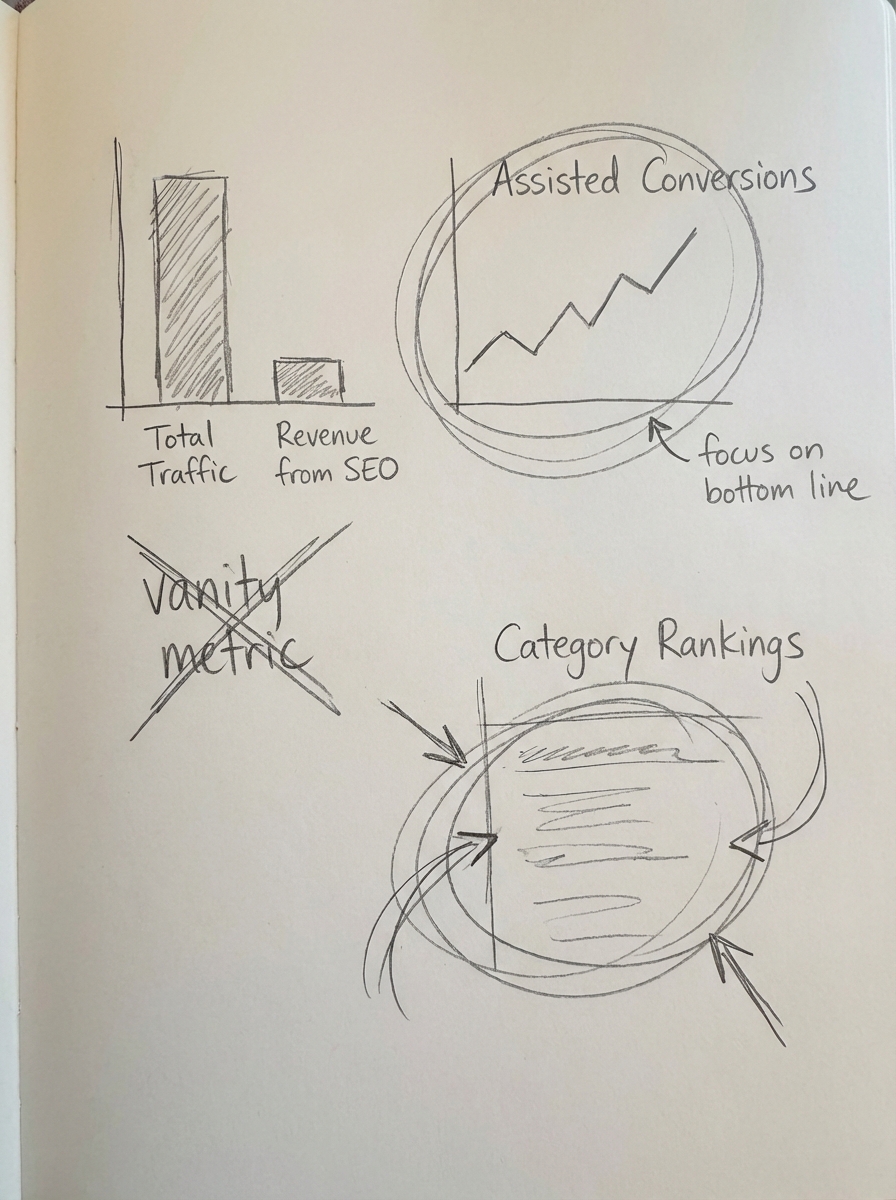
- Assisted Conversions: Track how many customers read a blog post and then completed a purchase within 30 days.
- Category Page Rankings: Monitor whether your spoke content is successfully lifting the rankings of your hub category pages.
- CTR by Page Type: Analyze whether your informational posts are attracting clicks and if they are successfully funneling users toward transactional pages.
I always tell my clients that I would rather have 100 visitors looking for a specific solution we sell than 10,000 visitors looking for a generic definition we don’t.
TL;DR
A practical WooCommerce content strategy uses a hub-and-spoke model to build authority for your category pages. Start by grouping keywords to prevent cannibalization and map your topics to the specific stages of the buyer’s journey. Use a documented workflow to ensure consistency and leverage AI to scale your production. Measure your success by revenue and category rank improvements, rather than just raw traffic numbers.