


The only content performance metrics that matter for a WooCommerce store are those that directly correlate with revenue, as generic traffic is often a vanity metric that masks a lack of commercial intent.
In my experience, many ecommerce teams drown in data but starve for insights. They track pageviews and bounce rates while ignoring the fact that their blog is attracting “window shoppers” rather than buyers. To scale an ecommerce store, you need a measurement framework that bridges the gap between a Google Search Console impression and a WooCommerce “Order Complete” status. I have seen too many merchants celebrate a 50% increase in traffic that results in zero additional sales because they targeted keywords with no transactional value.
The hierarchy of ecommerce content KPIs
We categorize metrics into four distinct tiers. If you only focus on the top tier, you are running a hobby; if you master the bottom tier, you are running a business. This structure allows you to see exactly where the friction lies in your customer journey.
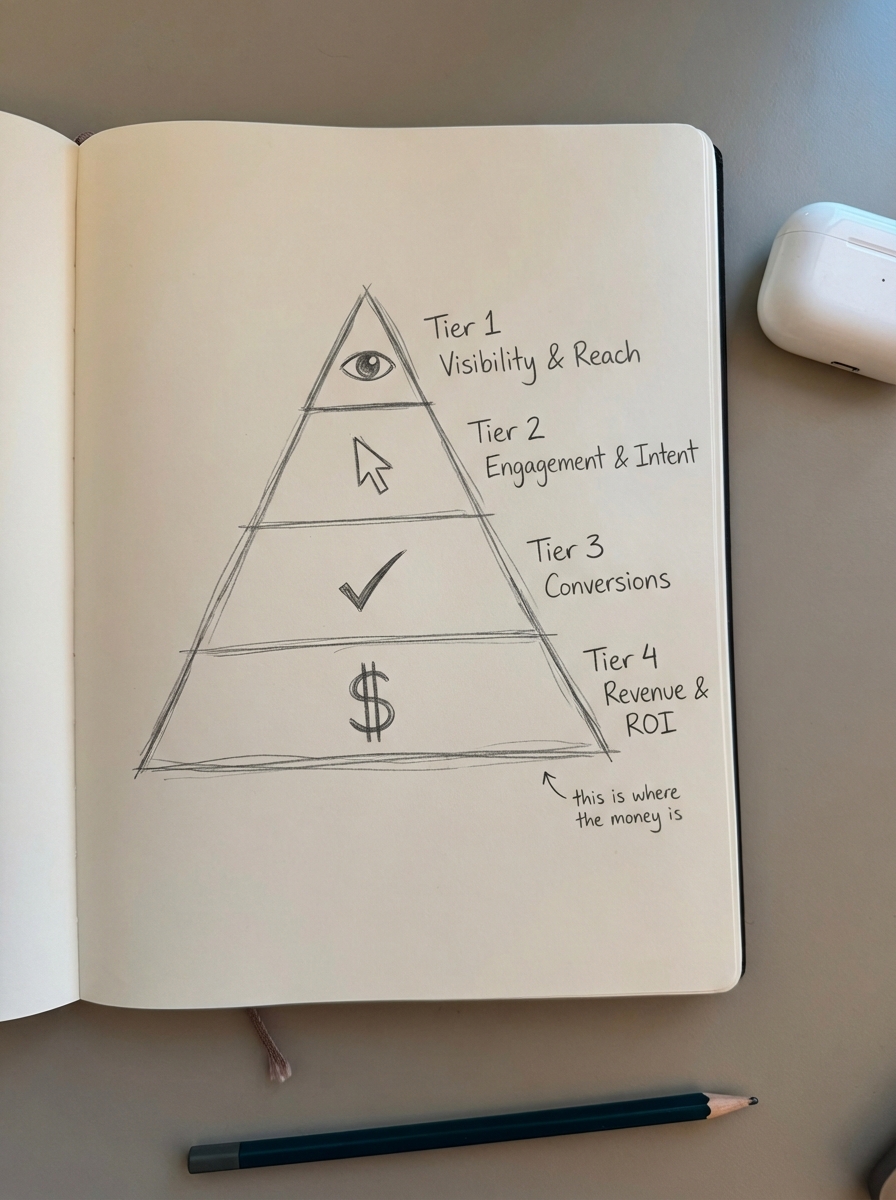
Tier 1: Visibility and reach
These metrics tell you if Google and Large Language Models (LLMs) even know you exist. While we believe 3rd party keyword data is often inaccurate, first-party data from Search Console is essential.
- Organic Impressions and Clicks: This is your baseline for visibility. I prefer using an ecommerce SEO dashboard to segment these by page type, allowing me to see if my category pages are actually getting the attention they deserve compared to the blog.
- AI Answer Visibility: With the rise of AI-driven search, you must track how often your content is cited in AI summaries. Businesses focusing on LLM optimization have seen a 1,200% increase in AI-generated answer traffic recently, highlighting a massive shift in how users find products.
- Potential Additional Clicks: This is a “what if” metric. It estimates the traffic you would gain by hitting position #1 for all keywords you currently rank for, helping you prioritize which content is worth the extra effort to push from page two to page one.
Tier 2: Engagement and intent
“Time on page” is often a misleading metric because a user could have left a tab open while away from their desk. To measure true intent, we look at active signals.
- Scroll Depth: This tells me if a user actually read a buyer’s guide or just bounced after the first paragraph.
- Internal Click-Through Rate (iCTR): This is the percentage of blog readers who click through to a category or product page. If your blog doesn’t drive users toward a purchase, it isn’t working for your business.
- Add-to-Cart from Content: By setting up specific events in GA4 for WooCommerce, you can track exactly which blog posts are directly responsible for a user putting an item in their basket.
Tier 3: Conversions
This tier connects your content strategy to your bottom line. It moves beyond “interest” and into “action.”
- Content-Assisted Conversion Rate: This tracks how many users touched a blog post or guide at any point before purchasing.
- Category Page CVR: We hold the contrarian view that optimizing category pages is far more important than individual product pages. Using a category page optimizer to ensure your category names match actual search behavior can drastically improve how often a browser becomes a buyer.
Tier 4: Revenue and ROI
This is the ultimate measure of success for any marketing team.
- Revenue per Organic Visit (RPOV): This is calculated by dividing total organic revenue by organic sessions. It tells you the literal dollar value of every person Google sends to your site.
- Content-Driven AOV: We often find that users who engage with content have a higher Average Order Value (AOV). A well-crafted buyer’s guide helps cross-sell related products and reduces purchase hesitation, leading to larger carts.
Why category metrics trump product metrics
A common mistake I see is merchants obsessing over the SEO of a single SKU that might go out of stock next week. This is a waste of resources. Your category pages are your true “money pages.” They are evergreen, they house your internal linking power, and they capture broad-intent searches – think “men’s waterproof hiking boots” rather than a specific model name that changes every season.

Data shows that merchants using AI-generated product schema and optimized category structures see an average 23% higher CTR for product-rich results. If you are just starting out, launch an MVP version of your content quickly. Don’t wait for perfection. We believe in iterating content like a product – publish an AI-generated base, then refine it once it shows signs of life in your SEO reports.
Tracking content decay and performance gaps
Content performance isn’t a “set it and forget it” task. Content decay is a silent killer of ecommerce rankings. When a “Top 10 Coffee Makers” post from two years ago still references discontinued models, your bounce rate will spike, and Google will eventually demote you.
We use SEO content audits to identify pages where traffic is dropping despite stable rankings, which usually indicates a drop in CTR or a shift in search intent. To operationalize this and prevent your blog from becoming obsolete, you should focus on three main areas:
- Catalog Syncing: Your blog must remain aware of your product catalog so it doesn’t promote out-of-stock items.
- Automation: Using a tool like the ContentGecko WordPress connector ensures your content stays “catalog-aware” without requiring manual edits every time a price or SKU changes.
- Intent Clustering: Use keyword clustering to ensure you aren’t cannibalizing your own rankings by having multiple posts targeting the same search intent.
The repeatable measurement stack
To track these metrics effectively without spending 10 hours a week in spreadsheets, you need a unified stack that talks to each other.
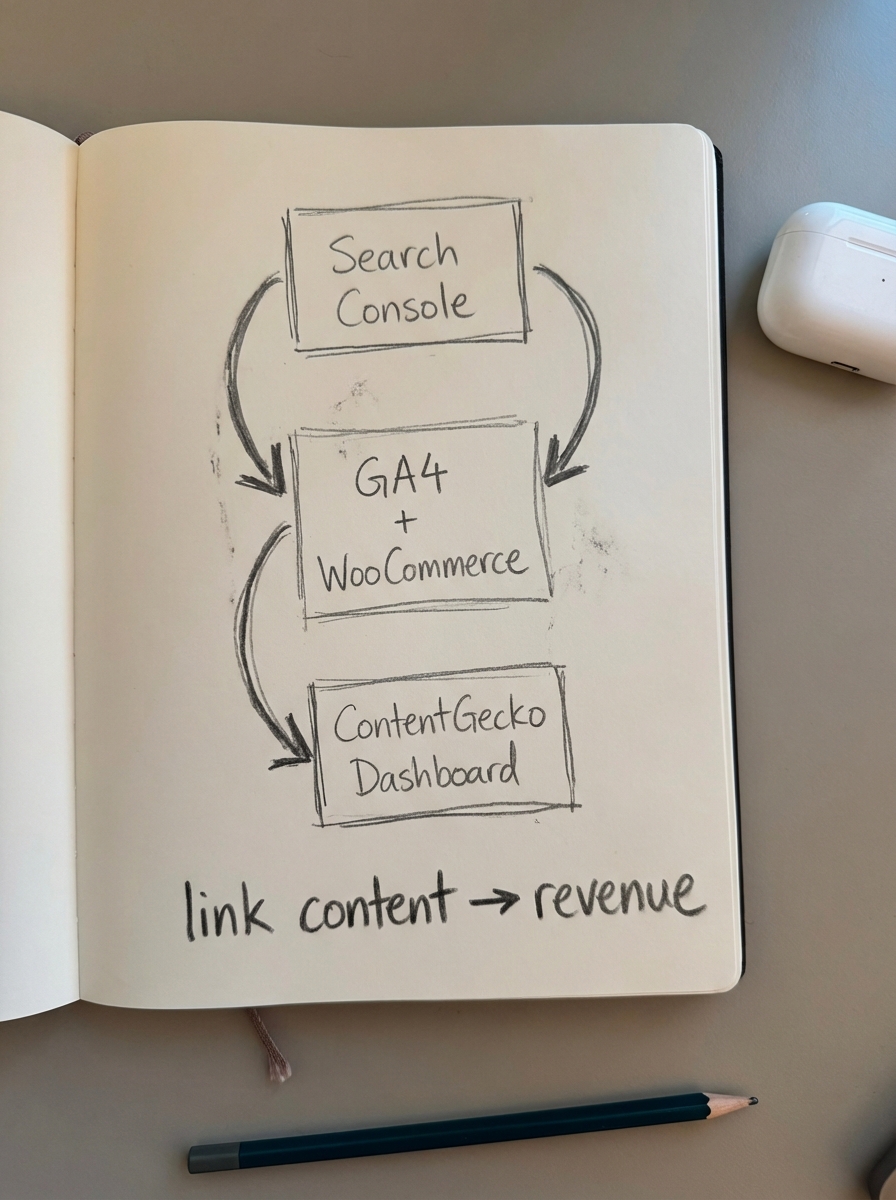
- Google Search Console: This provides the raw visibility and ranking data you need to understand your top-of-funnel reach.
- GA4 + WooCommerce Integration: This is necessary to link your sessions to actual transaction IDs and revenue data.
- ContentGecko Dashboard: This allows you to segment performance by page type automatically and see the direct ROI of your automated content efforts.
I have found that data visualization is the most effective way to get stakeholder buy-in. A simple line chart showing organic revenue growth is worth significantly more than a 50-page technical audit when you are trying to justify a content budget.
TL;DR
Stop tracking vanity metrics and focus on Content-Assisted Revenue and Category Page CVR. Optimize your category names first, automate your content updates to prevent decay, and use a unified SEO dashboard to link search efforts directly to WooCommerce sales. Most ecommerce stores would benefit more from a single well-optimized category page than fifty mediocre product descriptions.