


Effective SEO reporting for WooCommerce is not about tracking every available metric; it is about connecting search intent to specific catalog revenue. If you are still looking at “total organic sessions” as your primary KPI, you are missing the underlying health of your store’s funnel.
Why page type segmentation is the foundation of ecommerce reporting
The biggest mistake I see in WooCommerce analytics is blending all organic traffic into a single bucket. A click to a blog post about “how to style linen shirts” carries a completely different intent and conversion probability than a click to your “Men’s Linen Shirts” category page. Without granular page type segmentation, you cannot answer the two most important questions in ecommerce SEO: whether your high-intent category pages are gaining visibility for transactional keywords and whether your blog content is successfully pushing users toward product checkouts.
I recommend setting up URL-pattern filters within your ecommerce SEO dashboard to isolate performance. Usually, this means grouping URLs that include /product/, /product-category/, and /blog/ into separate buckets. This allows you to identify if a traffic spike is merely a viral blog post that doesn’t convert or a genuine ranking improvement on a high-margin category.
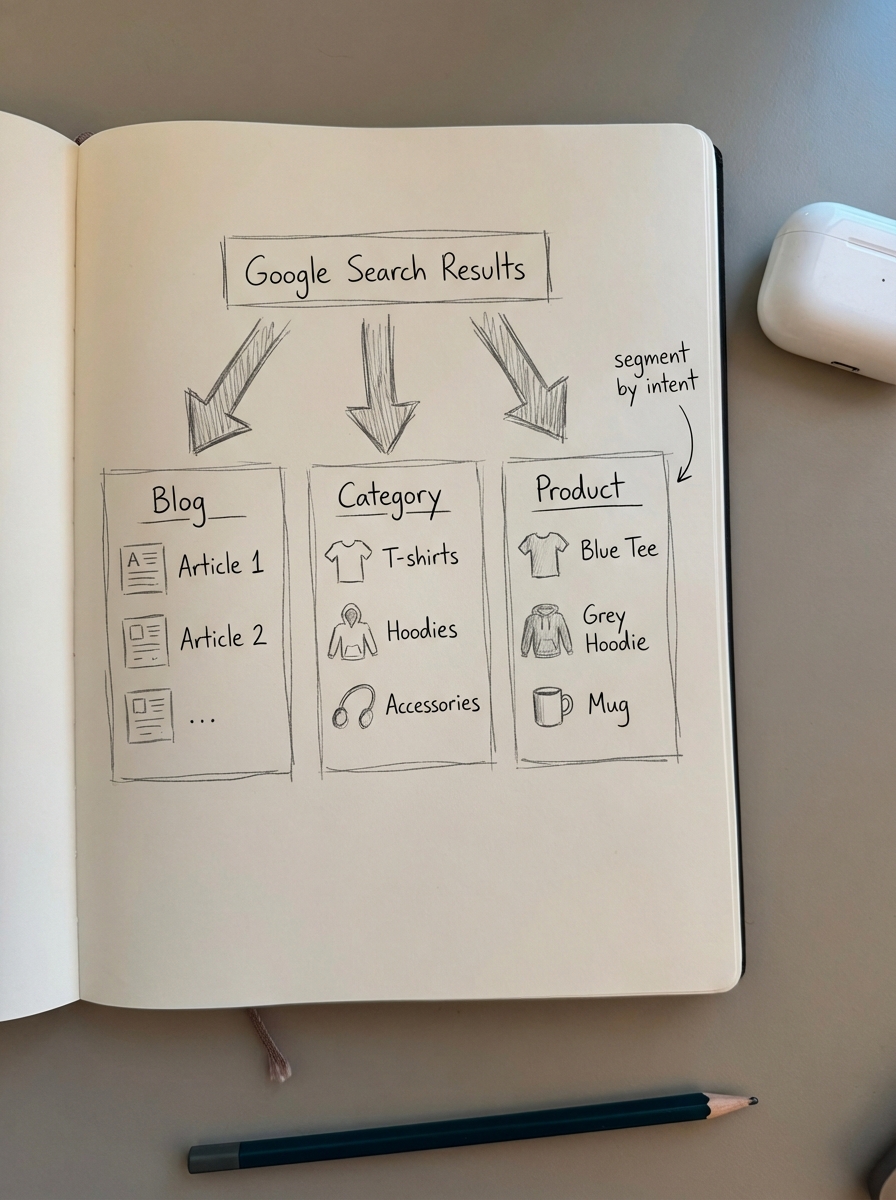
Some might argue that total traffic is a rising tide that lifts all boats, but I disagree. In my experience, celebrating informational traffic spikes while your category pages stagnate on the second page of Google is a recipe for stagnant revenue.
The metrics that actually matter for WooCommerce
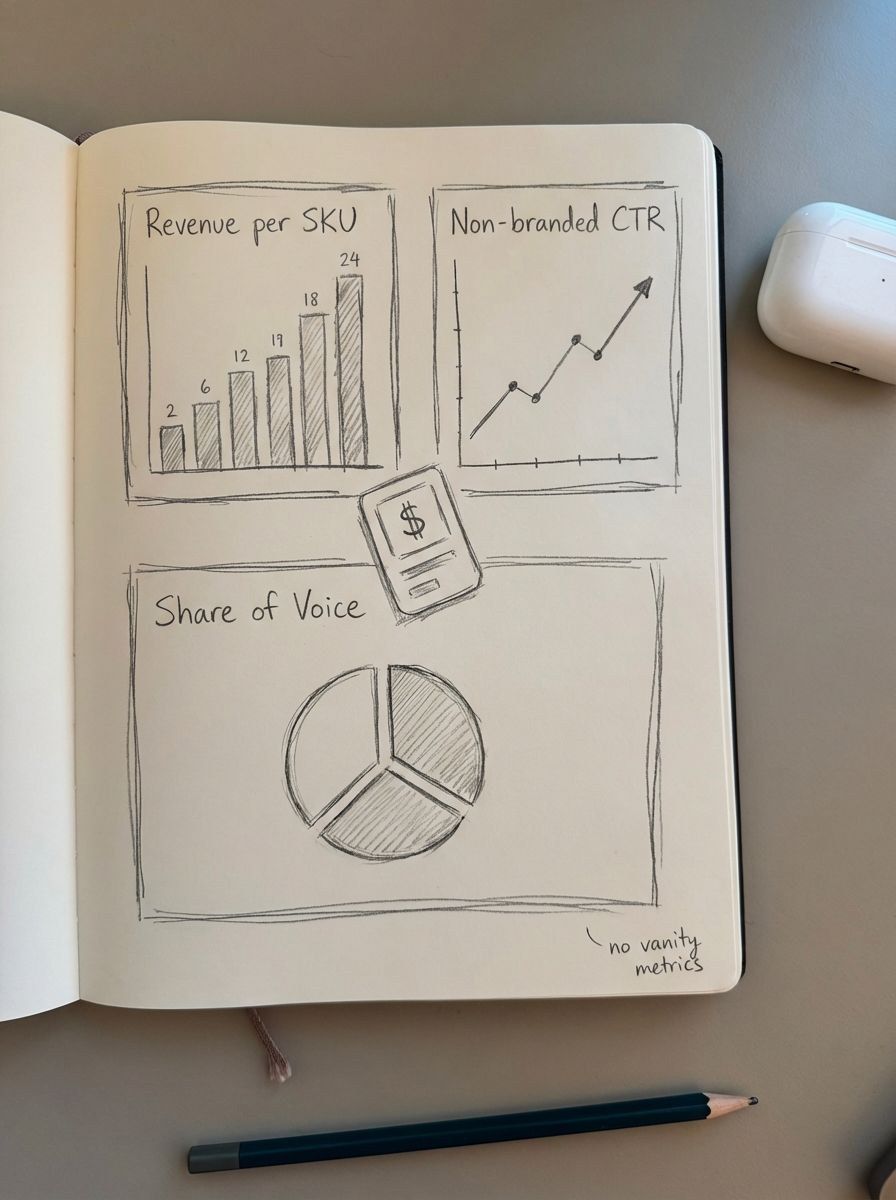
Forget vanity metrics like total impressions. If your impressions are rising but your click-through rate remains flat, you are likely ranking for irrelevant terms or your meta titles are failing to beat the competition. In a modern ecommerce environment, the focus must shift to SKU-level performance and non-branded visibility.
- Revenue per Organic Session per SKU: This is the most valuable metric for any store owner. By matching your GA4 ecommerce data with organic landing pages, you can calculate the literal dollar value of an organic visit to a specific product or category.
- Non-Branded CTR by Position: If you rank in the top three for a high-volume category term but your CTR is below the standard SEO benchmarks of roughly 8-10%, your SERP presence is weak. You likely need to address missing or invalid schema, which can reduce rich result eligibility by over 30%.
- Organic Visibility (Share of Voice): Third-party keyword databases are often too small to represent your entire opportunity. Instead of tracking thousands of keywords, track your visibility for the top 20% of terms that drive 80% of your revenue.
- Category Page Performance: I believe that for most stores, optimizing category names and descriptions is significantly more valuable than focusing on individual product pages. Categories target broader keywords with higher search volume and possess better link equity than SKUs that may eventually go out of stock.
How to interpret and act on SEO shifts
When you see a change in your report, you need a diagnostic framework to act on it. Numbers without context lead to reactionary strategies that often do more harm than good. I use three specific scenarios to triage performance shifts.
If impressions are up but clicks are down, it usually indicates you have started ranking for broad terms on the second or third page, or a competitor has captured a Featured Snippet. Do not celebrate the visibility gain; instead, analyze your Search Console and GA4 data to see if you can optimize your titles to reclaim that traffic.
When blog traffic is booming but revenue is stagnant, you likely have an internal linking problem. You are attracting “information seekers” who are not being funneled toward your product pages. I often use the ContentGecko connector plugin to bridge this gap by automatically inserting catalog-aware internal links and product callouts into blog content based on real-time inventory levels.
A sudden drop in average position across core pages should trigger a technical audit. Before panicking about an algorithm update, check for technical bloat. A common WooCommerce failure mode is a bloated crawl budget caused by duplicate pages, faceted navigation issues, or broken hreflang setups. If your category pages drop, it is often a sign that Google is struggling to crawl the site efficiently.
Building your SEO reporting stack
To get these insights, you need a unified stack that goes beyond the basic WooCommerce dashboard. Relying on disconnected tools leads to manual data entry, which typically wastes 10 to 15 hours of a team’s week.
- Google Search Console (GSC): This remains the only accurate source for rankings and impressions. You must ensure you have completed the GA4 and Search Console setup for WooCommerce to see the full journey from a search query to a final purchase.
- GA4 with Enhanced Ecommerce: Your
item_idparameter must match your WooCommerce SKU exactly. If this connection is broken, your conversion analysis for SEO is fundamentally flawed. - Automated Dashboards: To scale, you must automate SEO reporting. A well-built dashboard should pull from both GSC and GA4, allowing you to monitor ranking fluctuations and technical health without manual exports.
At ContentGecko, we take this a step further by syncing your WooCommerce catalog directly with our reporting. This allows us to see when a product goes out of stock and automatically deprioritize the SEO content driving traffic to it, preventing “dead-end” organic visits that frustrate users and hurt conversion rates.
Iterating based on search data
Reporting is only valuable if it leads to iteration. Once a month, I export organic queries and look for keywords ranking in positions 8 through 15. These are pages that Google already likes but needs a “nudge” to reach the top three positions where the majority of clicks happen.
Usually, that nudge is not more backlinks. I find that traditional link building is often too expensive or difficult to be profitable for most companies. Instead, the win usually comes from improving the internal link structure with breadcrumbs or re-optimizing the content to better match current search intent.
Treat your content like a product: launch an MVP – even an AI-generated article – monitor the reporting, and then only spend human resources on the articles that show initial traction. This iterative approach ensures you are investing your budget where it has the highest potential for ROI.

TL;DR
- Segment organic traffic by page type (blog vs. category vs. product) to understand intent.
- Focus on revenue per SKU from organic search rather than just total clicks or impressions.
- Prioritize category pages over product pages for better link equity and higher search volume.
- Automate your reporting stack to save time and ensure your data remains a single source of truth.
- Never drive organic traffic to out-of-stock products by linking your reporting to your live catalog state.