


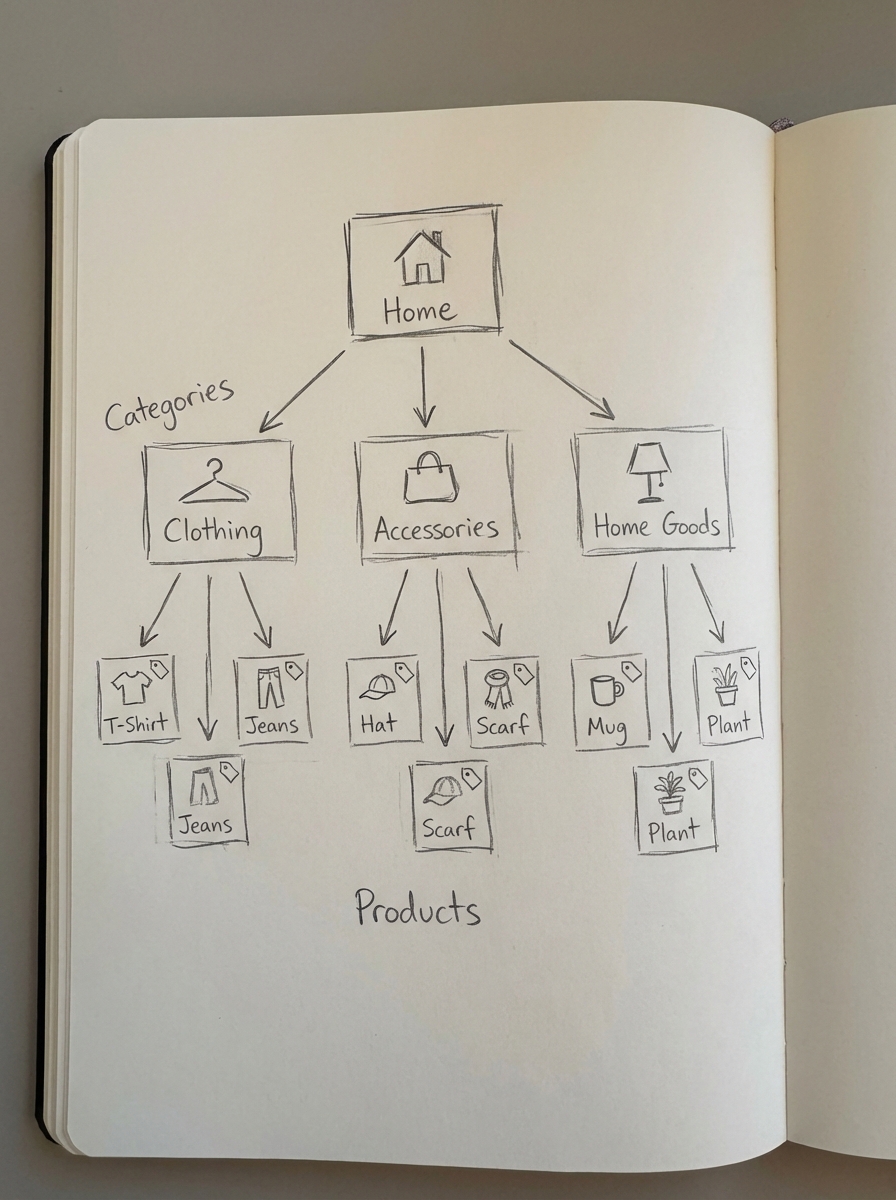
Site architecture is the single most important factor determining how Google allocates crawl budget and link equity across your store. A flat, logical hierarchy ensures that authority flows from your homepage to your high-margin categories, preventing your most important products from being buried in a crawl maze that search bots simply refuse to navigate.
I have found that many WooCommerce merchants over-complicate their structure by focusing obsessively on individual product pages. In reality, your category pages are your true SEO powerhouses, and once the technical foundation is set, your blog is where the remaining growth opportunity lies. If your architecture doesn’t support these two pillars, you are essentially leaving money on the table while making it harder for search engines to understand your topical relevance.
The foundation of category-first architecture
The most common technical SEO mistake I see in ecommerce is a bloated website with thousands of duplicate pages caused by poor categorization. Many stores rely on vague, high-level category names like “Accessories” or “New Arrivals,” which provide almost no keyword context to search engines. Specificity is the lowest-hanging fruit in ecommerce SEO. Instead of a generic “Shoes” category, a structure targeting “Men’s Waterproof Running Shoes” matches specific search intent and allows you to build a topical silo that Google can actually rank.
If you aren’t sure where your current naming conventions are failing, we offer a free ecommerce category optimizer to help identify missed opportunities in your taxonomy. When you design your hierarchy, I always advocate for the “three-click rule.” No product or subcategory should be more than three clicks away from the root domain. This rigid focus on depth keeps your WooCommerce crawl budget concentrated on pages that drive revenue rather than getting lost in deep, low-value archives.
Designing SEO-friendly WooCommerce URL structures
Your URL structure should provide a clear, logical path for both users and search bots. By default, WooCommerce often injects /product/ and /product-category/ into your slugs. While functional, these additions can make URLs unnecessarily long and dilute the keyword density of the slug. I recommend a structure that includes the category context to improve topical relevance, such as yourstore.com/category/product-name/. This tells Google exactly where the product sits within your catalog’s hierarchy.
When auditing your WooCommerce URL structure, keep the slugs as short as possible. Use hyphens to separate words – never underscores, as Google treats hyphens as word separators – and avoid including random parameters or IDs that don’t provide semantic value. If you are considering splitting your store into a subdomain, proceed with caution. Our analysis of subdomains vs. subfolders suggests that subfolders are almost always superior for SEO because they consolidate domain authority into a single “bank account” rather than diluting link equity across multiple entities.
Strategic internal linking and breadcrumbs
Internal links are the connective tissue of your site architecture, distributing PageRank and helping Googlebot discover new content efficiently. In a well-optimized WooCommerce internal linking strategy, you should intentionally prioritize links to your high-conversion and high-margin products. This ensures that your most profitable inventory receives the most “votes” from within your own site.
Breadcrumbs are perhaps the most underrated architectural element for WooCommerce stores. Beyond helping users navigate back to parent categories, they provide BreadcrumbList schema, which can improve your search engine click-through rate by up to 18%. I always ensure that breadcrumbs are not only visible to users but also correctly mapped to the actual category hierarchy in the site’s source code.
For large stores, manual linking eventually becomes a bottleneck. I have seen stores with 10,000 products where nearly 40% of the catalog is “orphaned,” meaning those products have no internal links pointing to them. This is where internal linking automation becomes essential for enterprise-level stores to ensure every SKU is discoverable and indexed.
Managing faceted navigation and index bloat
Faceted navigation – the filters that let users sort by size, color, or price – is a primary source of duplicate content in WooCommerce. Every time a user applies a filter, a new URL is generated. A simple setup with five attributes and ten options can create over 100,000 unique URLs, most of which have no search value. To protect your rankings, you must decide which of these pages should be indexable.
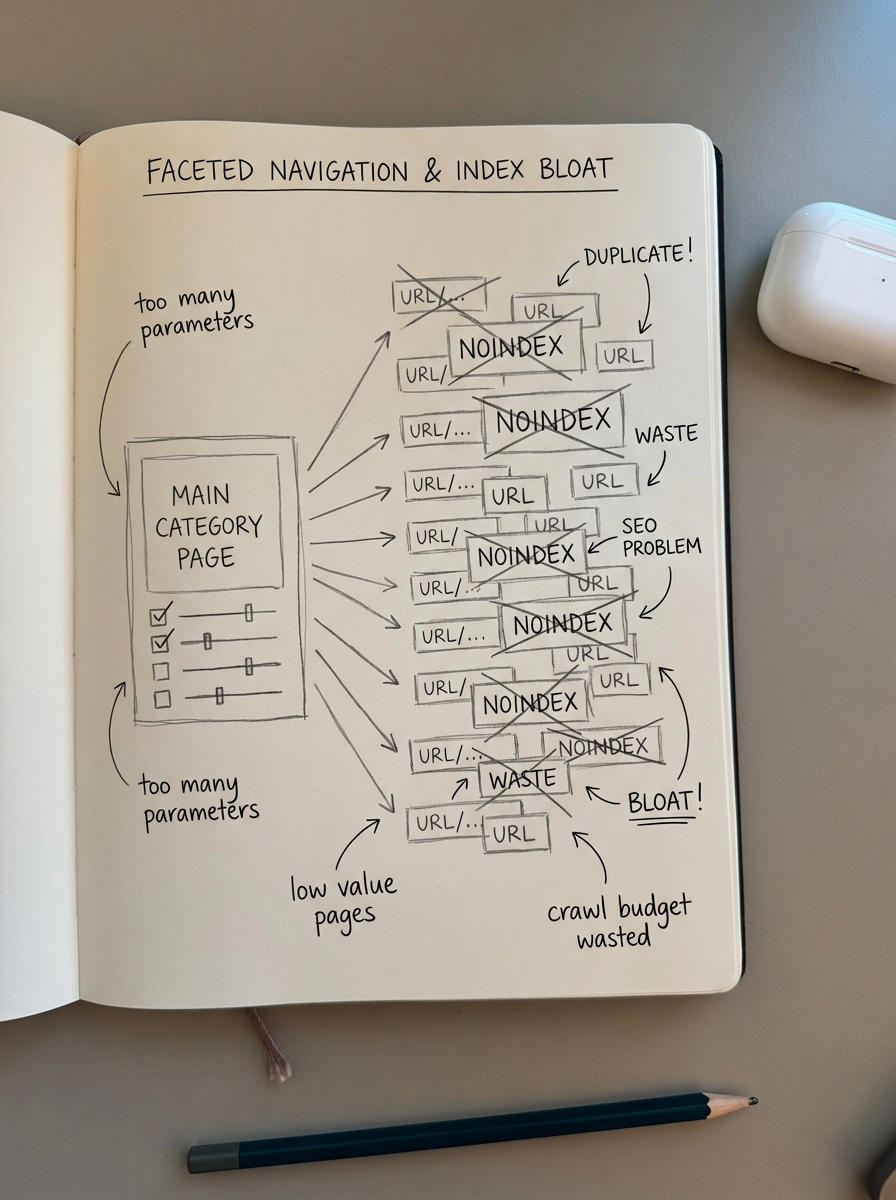
A professional strategy for faceted navigation SEO follows a specific hierarchy of control:
- Index high-value single filters that have documented search volume, such as “Red Dresses.”
- Apply noindex tags to multi-filter combinations that serve user experience but have no search demand.
- Block low-value parameters like “sort by price” or “per page” counts via your robots.txt file to save crawl budget.
In all cases, use canonical tags to point filtered versions back to the main category page. This consolidates ranking signals and prevents “index bloat,” a situation where Google spends its time crawling thousands of near-identical pages instead of your newest products.
Sitemaps and pagination logic
Your XML sitemap should be a clean list of only your canonical, indexable URLs. I never include paginated pages, tags, or filtered results in a sitemap, as this confuses search engines about which version of a page is the “primary” one. If you have a massive catalog, use a sitemap index to split your URLs into smaller, manageable files.
Regarding pagination SEO, the most frequent error I see is merchants canonicalizing “Page 2” back to “Page 1.” This tells Google that the second page is a duplicate, which effectively prevents products on those deeper pages from being indexed. Each paginated page must have a self-referencing canonical tag. This ensures search engines can crawl through your entire archive and discover every product you have for sale.
Scaling with topic clusters
Once your technical foundation is solid, the real opportunity for growth lies in building SEO topic clusters. This strategy involves creating informational blog content that supports and links back to your commercial category pages. This “Hub and Spoke” model signals to Google that your commercial categories are the authoritative source for a specific topic.
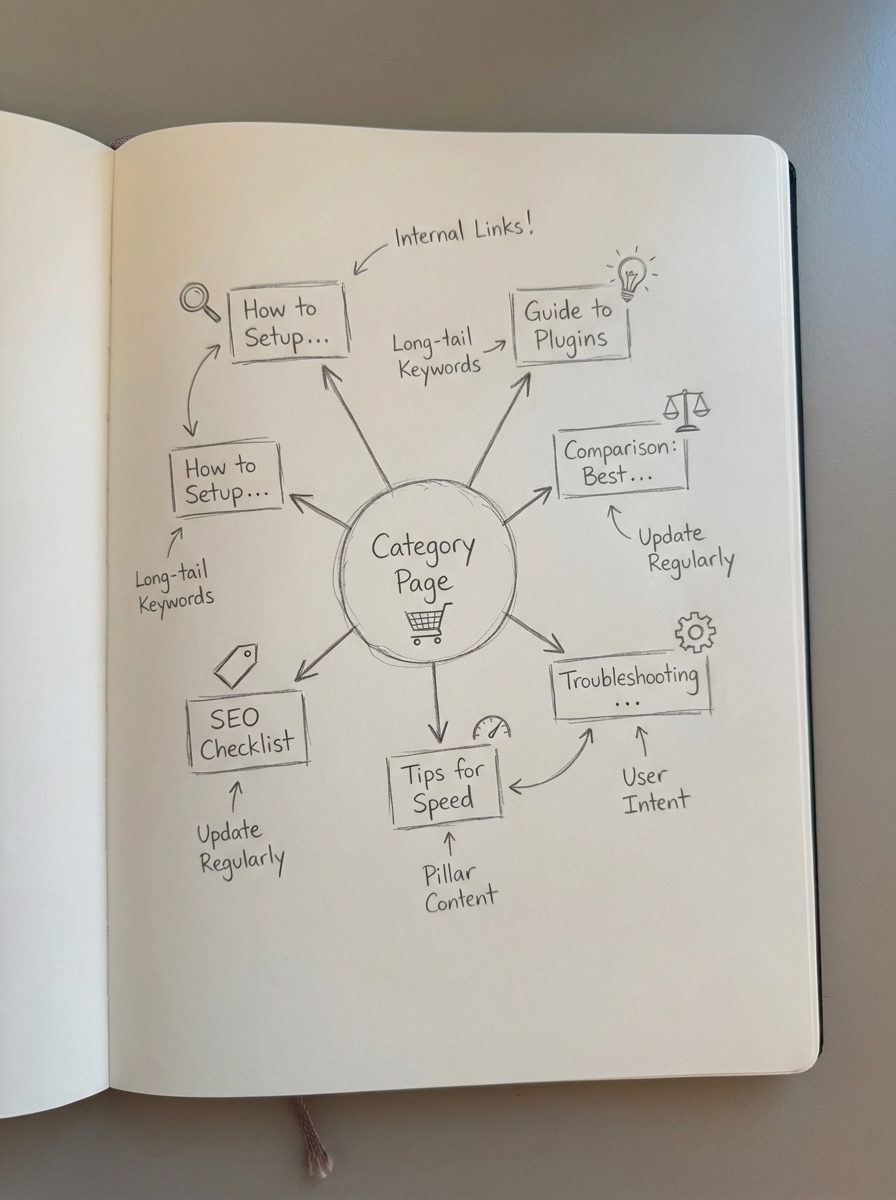
For example, an “Espresso Machines” category page acts as the hub, while blog posts about “How to clean an espresso machine” or “Manual vs Automatic Espresso Machines” act as the spokes. These spokes provide the informational value that ranks for long-tail keywords and funnels traffic to your products. This is exactly what we built ContentGecko to do; our platform automatically plans and publishes catalog-synced content that links directly to your products, ensuring your architecture is constantly reinforced by fresh internal links. To monitor how these clusters impact your bottom line, I recommend using our ecommerce SEO dashboard to segment performance by page type.
TL;DR
Effective WooCommerce site architecture requires a strict category-first hierarchy, clean URL structures, and aggressive management of faceted navigation to prevent index bloat. Focus on optimizing your category names for specific search intent, implement self-referencing canonicals for all paginated pages, and ensure your breadcrumb schema is correctly implemented. Once the technical basics are in place, scale your authority by building automated topic clusters that link informational blog content back to your core commercial pages.